If you run a business in Texas, you have probably had this conversation with yourself at least once: “Do I need a mobile app?” Maybe a customer asked why you do not have one. Maybe a competitor in Dallas or Austin launched one and you noticed the difference in how they engage customers. Or maybe you are simply trying to understand what mobile application development actually involves before you commit budget to it.
This guide answers that question completely. It walks through what mobile app development is, how it actually works behind the scenes, what it costs in Texas specifically, how long it takes, and how businesses across healthcare, real estate, logistics, retail, and manufacturing are using mobile apps to solve real operational problems. By the end, you should be able to walk into a conversation with a development agency and know exactly what you are talking about.
2. What Is Mobile Application Development?
Quick Definition
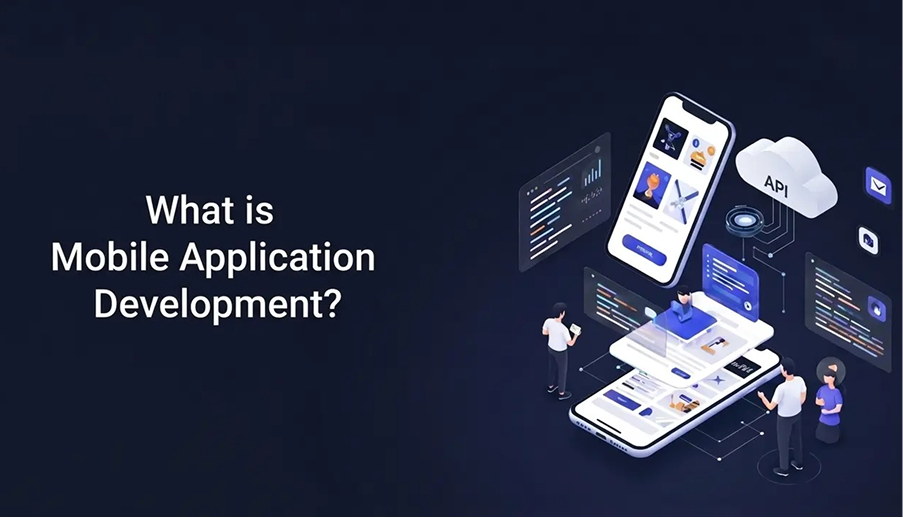
Mobile application development is the process of designing, building, testing, and deploying software applications that run on mobile devices such as smartphones and tablets. It includes everything from planning the app’s purpose and user experience to writing the code, connecting it to servers and databases, and publishing it to platforms like the Apple App Store and Google Play Store.
In simpler terms: it is how an idea becomes the app icon someone taps on their phone.
The process typically involves several specialized disciplines working together:
- UI/UX designers who plan how the app looks and feels
- Frontend developers who build what the user sees and interacts with
- Backend developers who build the server-side logic and databases that power the app
- QA engineers who test everything before it reaches real users
Mobile app development is not a single skill. It is a coordinated effort across design, engineering, infrastructure, and business strategy.
3. Why Mobile Apps Matter Today
Smartphones are no longer a secondary device for most consumers and business users. For a large share of Americans, including Texans in Houston, Dallas, Austin, San Antonio, and Fort Worth, the phone is the primary way they interact with brands, manage their schedules, shop, and communicate. A business without a mobile presence is often invisible to a meaningful portion of its audience during the moments that matter most.
There are several practical reasons mobile apps continue to matter:
- Direct access to customers. Unlike a website, an app icon sits on a user’s home screen. That proximity creates repeat engagement that websites struggle to match.
- Push notifications. Apps can re-engage users directly, something email and social media cannot do with the same immediacy.
- Offline functionality. Native and hybrid apps can work without an active internet connection in ways websites generally cannot, which matters for field service, logistics, and retail businesses.
- Hardware access. Apps can use a phone’s camera, GPS, biometric sensors, and Bluetooth in ways a browser-based experience often cannot replicate fully.
- Brand presence. For B2B and B2C companies alike, having a polished app signals technical credibility, particularly to enterprise buyers evaluating vendors.
None of this means every business needs an app. A small local bakery may get more value from a strong website and Google Business Profile than from a custom app. But for businesses with repeat customer interactions, field operations, complex workflows, or a need for real-time communication, an app often becomes a competitive necessity rather than a nice-to-have.
4. How Mobile App Development Works
At a high level, mobile app development works in layers, similar to how a building has a foundation, structure, and finished interior.
- The frontend (client side) is what users see and touch: buttons, screens, animations, navigation. This is built using platform-specific languages like Swift for iOS or Kotlin for Android, or cross-platform frameworks like Flutter or React Native.
- The backend (server side) is the engine behind the scenes. It handles user accounts, business logic, data storage, and processing, typically hosted on cloud platforms such as AWS, Google Cloud, or Microsoft Azure.
- The API layer connects the two. REST APIs and GraphQL APIs allow the frontend app to request and send data to the backend without the user ever seeing it happen.
- The database stores everything: user profiles, transaction history, inventory levels, messages, and more. Choosing the right database depends on the nature of the data and how it needs to scale.
- Cloud infrastructure ties it all together, providing the servers, storage, and computing power the app needs to run reliably as user numbers grow.
A working mobile app is the result of all these layers communicating correctly, securely, and quickly.
5. Types of Mobile Applications
Native Applications
Built specifically for one operating system using that platform’s own language and tools. iOS apps are typically built with Swift in Xcode. Android apps are typically built with Kotlin in Android Studio. Native apps generally offer the best performance and the smoothest user experience, but they require separate codebases (and separate budgets) for each platform.
Cross-Platform Applications
Built once using a shared codebase that compiles down to run on both iOS and Android. Flutter (developed by Google) and React Native (developed by Meta) are the two dominant frameworks here. Cross-platform development has become the default choice for many startups and SMBs because it significantly reduces cost and development time while still delivering near-native performance for most use cases.
Hybrid Applications
Essentially web applications wrapped inside a native shell, often built with web technologies such as HTML, CSS, and JavaScript using frameworks like Ionic. They tend to be the fastest and cheapest to build but typically offer the weakest performance and the most limited access to device features.
6. Native vs Hybrid vs Cross-Platform
Use this comparison to guide your technology decision:
| Factor | Native | Cross-Platform | Hybrid |
| Performance | Highest | Near-native | Lower |
| Development Cost | Highest | Moderate | Lowest |
| Time to Market | Slowest | Moderate | Fastest |
| Hardware Access | Full | Mostly Full | Limited |
| Code Reuse | None | High (90%+) | High |
| Best For | High-performance, complex apps | Most business and startup apps | Simple, content-based apps |
| Common Tools | Swift, Kotlin | Flutter, React Native | Ionic, Cordova |
Quick Answer: Which Type Should You Choose?
If your app needs top-tier performance or deep hardware integration, native is usually the right call. If you need both iOS and Android with a reasonable budget and timeline, cross-platform (Flutter or React Native) is typically the best balance. If your app is content-driven with simple functionality and budget is the primary constraint, hybrid can work, though it is becoming less common as cross-platform tools have matured. Not sure which approach fits your project? Our technical consultancy team can help you evaluate the right path before you commit.
7. The Mobile App Development Process
A well-run mobile app project generally follows a structured sequence. Skipping steps here is one of the most common reasons projects go over budget or fail to meet user expectations.
- Discovery and Strategy — Defining the app’s purpose, target users, core features, and business goals. This is also where competitive research happens.
- Wireframing and Prototyping — Creating low-fidelity sketches and clickable prototypes of the app’s structure before any code is written, allowing stakeholders to validate the flow early when changes are cheap.
- UI/UX Design — Translating wireframes into polished, branded visual designs, including every screen, state, and interaction pattern.
- MVP Definition — Identifying the Minimum Viable Product, the smallest version of the app that delivers real value, so the business can launch faster and validate demand before investing in every feature.
- Backend and API Development — Building the server infrastructure, database schema, and API endpoints that will power the app.
- Frontend Development — Building the actual app screens and connecting them to the backend through APIs.
- Integration — Connecting third-party services such as payment gateways, push notification services, analytics tools, or mapping APIs.
- Quality Assurance and Testing — Rigorously testing functionality, performance, security, and usability across devices.
- Deployment — Publishing the app to the Apple App Store and/or Google Play Store, following each platform’s review guidelines.
- Post-Launch Maintenance — Monitoring performance, fixing bugs, releasing updates, and adapting to new OS versions.
Most modern development teams run this process using Agile or Scrum methodologies, working in short sprints with regular check-ins rather than a single long build-and-deliver cycle. This reduces risk and gives business stakeholders visibility throughout the project.
8. Essential Technologies in Mobile App Development
Programming Languages
Swift (iOS native), Kotlin (Android native), Dart (used with Flutter), and JavaScript/TypeScript (used with React Native) are the dominant languages in modern mobile development.
Frameworks
Flutter and React Native lead cross-platform development. SwiftUI and UIKit are standard for native iOS. Jetpack Compose is the modern standard for native Android UI.
Backend Technologies
Node.js, Python (Django/FastAPI), and Java/Kotlin-based backends are common choices, often built as microservices rather than a single monolithic system, which allows different parts of the app to scale independently.
Cloud Services
AWS, Google Cloud, and Microsoft Azure provide the hosting, storage, authentication, and scaling infrastructure most modern apps rely on. Firebase, a Google product, is especially popular for startups and MVPs because it bundles authentication, a real-time database, hosting, and push notifications into one service, reducing initial backend complexity.
Database Options
Relational databases like PostgreSQL or MySQL suit apps with structured, relationship-heavy data such as e-commerce orders or financial records. NoSQL databases like Firebase Firestore or MongoDB suit apps needing flexible, fast-changing data structures such as chat applications or content feeds.
DevOps and CI/CD
Continuous Integration/Continuous Deployment pipelines automate testing and release processes, allowing teams to ship updates faster and with fewer manual errors. This has become standard practice on professional development teams rather than an optional extra.
9. UI/UX Importance in Mobile App Development
A technically flawless app with poor UI/UX will still fail. User experience design determines whether someone finds the app intuitive or abandons it within the first session, and that first session matters enormously — industry data consistently shows that a large share of users who abandon an app do so within the first few days of installing it.
Good UI/UX in a mobile context means:
- Minimal cognitive load — users should never have to think hard about what to tap next
- Consistency with platform conventions — an iOS app should feel like an iOS app
- Fast load times across varying network conditions
- Accessible design for users with visual or motor impairments
- Clear feedback for every action a user takes
This is why wireframing and prototyping happen before development begins. It is far cheaper to redesign a screen on paper or in a tool like Figma than to rebuild it after it has already been coded. See how we approach product design and UX strategy across our client work in our portfolio.
10. Security Best Practices
Mobile apps frequently handle sensitive data: payment details, health records, location history, personal identification. Security cannot be an afterthought.
- Data encryption both in transit (using HTTPS/TLS) and at rest in the database
- Secure authentication including biometric authentication and multi-factor authentication where appropriate
- Regular security audits and penetration testing
- Secure API design to prevent unauthorized data access
- Compliance with relevant regulations such as HIPAA for healthcare apps or PCI-DSS for apps handling payment data
For Texas businesses in regulated industries like healthcare, finance, or real estate, security and compliance are not optional add-ons. They often determine whether an app is legally permitted to operate at all. If you are navigating compliance requirements specific to your industry, our technical consultancy team can help you build the right architecture from the start.
11. Testing and Quality Assurance
Quality Assurance in mobile development covers far more than checking whether buttons work. A thorough QA process includes:
- Functional testing — does every feature behave as intended
- Compatibility testing — does the app work correctly across different device models, screen sizes, and OS versions
- Performance testing — how does the app behave under load or on older devices
- Security testing — vulnerability scans and penetration testing
- Usability testing — real users interacting with real builds
Mobile testing is particularly demanding because of device fragmentation, especially on Android, where thousands of device and OS version combinations exist. A responsible development team tests across a representative sample of devices rather than assuming one test environment reflects the real world.
12. Deployment and App Store Publishing
Once an app passes QA, it moves to deployment. This involves preparing app store listings, including titles, descriptions, screenshots, and keywords, for both the Apple App Store and Google Play Store. This process is closely tied to App Store Optimization, the mobile equivalent of SEO.
Apple’s review process tends to be stricter and can take anywhere from a day to over a week, with apps sometimes rejected for guideline violations that need to be corrected and resubmitted. Google Play’s review process is generally faster but still involves automated and manual checks.
Important
Businesses should budget time for the app store review cycle rather than assuming the app goes live the moment it is submitted. Plan for at least one to two weeks of review time in your launch timeline.
13. Maintenance After Launch
Launching an app is the beginning, not the end. Mobile operating systems update regularly, and apps that are not maintained can break, get flagged by app stores, or simply fall behind user expectations.
Ongoing maintenance typically includes:
- Bug fixes identified by users or monitoring systems
- Performance monitoring and optimization
- Compatibility updates for new iOS and Android OS versions
- Security patches as vulnerabilities are discovered
- Feature updates based on user feedback and analytics data
Businesses should plan for an ongoing maintenance budget, not just a one-time build cost. A common industry guideline is to budget approximately 15 to 20 percent of the original development cost annually for maintenance, though this varies by app complexity. If you need a dedicated team to handle ongoing support and iteration, explore our hire dedicated team and resource outsourcing options.
14. Cost of Mobile App Development in Texas
This is usually the question business owners care about most, and the honest answer is: it depends heavily on scope. Here is a general guide for the Texas market:
| App Complexity | Typical Cost Range | Examples |
| Simple App | $15,000 – $40,000 | Basic features, few screens, minimal backend |
| Medium-Complexity | $40,000 – $100,000 | Custom UI, user accounts, API integrations |
| Complex / Enterprise | $100,000 – $500,000+ | Advanced features, heavy backend, compliance requirements |
Several factors drive these numbers up or down: native versus cross-platform development, the complexity of backend logic, the number and complexity of third-party integrations, design complexity, and ongoing maintenance needs.
Texas-based agencies in cities like Houston, Dallas, and Austin often offer more competitive rates than coastal tech hubs while still providing experienced teams, which is part of why Texas has become an attractive market for both startups and enterprises sourcing development talent.
Important Note
Any agency promising an exact fixed price before understanding your requirements in detail should be approached with caution. Reasonable cost estimates come after a discovery phase, not before it. Contact us to walk through your project scope and get a realistic estimate.
15. Timeline Expectations
| App Type | Typical Timeline |
| Simple MVP | 2 – 4 months |
| Medium-Complexity App | 4 – 8 months |
| Complex Enterprise App | 8 – 14+ months |
Rushing a timeline almost always increases long-term cost through technical debt and post-launch bugs. A realistic, phased timeline with clear milestones tends to produce a more stable, successful app than an aggressive build-it-fast approach.
16. Common Challenges in Mobile App Development
- Scope creep — new feature requests keep expanding the project beyond its original budget and timeline
- Device fragmentation — particularly on Android, which complicates testing and support across thousands of device and OS combinations
- Choosing the wrong development approach early — for example, building native for both platforms when cross-platform would have met the business need at half the cost
- Underestimating backend complexity — the visible app is often a smaller engineering effort than the invisible backend powering it
- Poor planning around app store approval timelines — builds can be delayed by review cycles
- Neglecting post-launch maintenance budgets — leading to apps that degrade in performance or security over time
Most of these challenges are avoidable with proper discovery and planning at the start of a project, which is why the discovery phase deserves more time and attention than businesses often give it. Our customized development solutions are structured to address these risks from day one.
17. Benefits for Businesses
Done well, a mobile app can deliver measurable business value:
- Stronger customer retention through direct, frequent engagement via push notifications and a persistent home screen presence
- New revenue channels through in-app purchases, subscriptions, or streamlined checkout experiences
- Operational efficiency for businesses with field teams, logistics, or internal workflows that currently rely on paper or disconnected systems — the kind of transformation our business process automation services are built for
- Valuable data and analytics on customer behavior patterns that inform product and marketing decisions
- A stronger competitive position in markets where customers increasingly expect a mobile-first experience
The key is aligning the app’s purpose with an actual business problem rather than building an app because it seems expected. The most successful apps solve a specific, well-defined problem for a specific audience.
18. Industry Use Cases
Healthcare
Apps supporting telehealth consultations, appointment scheduling, secure patient messaging, and medication tracking, almost always requiring HIPAA-compliant data handling and strong encryption. Healthcare providers in Houston’s Texas Medical Center and across the state are among the heaviest adopters of mobile health applications.
Real Estate
Property listing apps with map-based search, virtual tour integration, mortgage calculators, and direct messaging between agents and prospective buyers. Texas’s fast-growing metro markets in Austin, Dallas-Fort Worth, and Houston have driven real demand for mobile-first property discovery experiences. See how we built Landopia, a real estate platform designed for exactly this kind of experience.
Retail
Mobile commerce apps with personalized recommendations, loyalty programs, push-notification-driven promotions, and integrated payment systems that reduce checkout friction and increase repeat purchase rates. Our e-commerce and marketplace service covers the full stack for retail mobile builds.
Education
Learning management apps, virtual classroom tools, and student engagement platforms supporting both K-12 and higher education institutions across Texas’s large public university system.
Logistics
Fleet tracking, route optimization, delivery confirmation, and real-time shipment visibility apps, often relying heavily on GPS and offline functionality given the realities of field operations across a state as large as Texas. Our work on Godaam Technologies is a strong example of logistics-focused mobile and operations software.
Manufacturing
Inventory management, quality control checklists, and equipment maintenance tracking apps that connect floor operations to centralized backend systems, sometimes integrating IoT sensor data from connected equipment. These are exactly the kinds of workflows our enterprise applications practice is built to handle.
Finance
Secure banking, budgeting, and payment apps requiring rigorous security architecture and regulatory compliance including PCI-DSS and, depending on the use case, additional financial regulations. See our work on Dash ProFx as an example of fintech-adjacent mobile development.
Construction
Project management, job site documentation, and crew scheduling apps suited to Texas’s active construction and infrastructure sector, particularly across Houston and the broader Gulf Coast region.
19. Frequently Asked Questions
Q: What is mobile application development in simple terms?
It is the process of designing, building, and launching software apps that run on smartphones and tablets, covering everything from design and coding to testing and app store publishing.
Q: How much does it cost to build a mobile app in Texas?
Costs typically range from about $15,000 for a simple app to over $100,000 for a complex, enterprise-grade app, depending on features, platform choice, and backend complexity. Contact us for a scoped estimate based on your specific requirements.
Q: How long does it take to build a mobile app?
A simple MVP can take 2 to 4 months, a medium-complexity app 4 to 8 months, and a complex enterprise app 8 to 14 months or longer.
Q: What is the difference between native and cross-platform app development?
Native apps are built separately for iOS and Android using platform-specific languages, offering top performance but higher cost. Cross-platform apps share one codebase across both platforms, reducing cost and time with only minor trade-offs for most use cases.
Q: Should my business build a native app or a cross-platform app?
If you need maximum performance or deep hardware access, choose native. If you need both iOS and Android on a reasonable budget, cross-platform frameworks like Flutter or React Native are usually the better choice. Our technical consultancy team can help you make this call with confidence.
Q: What is an MVP in app development?
A Minimum Viable Product is the simplest version of an app that delivers real value to users, allowing a business to launch faster, gather feedback, and validate demand before investing in the full feature set.
Q: What technologies are used to build mobile apps?
Common technologies include Swift and Kotlin for native development, Flutter and React Native for cross-platform development, and backend services built on AWS, Google Cloud, Firebase, or Azure.
Q: Do I need a separate app for iOS and Android?
Not necessarily. Cross-platform frameworks allow a single codebase to run on both platforms, which is why most startups and SMBs choose this route unless there is a specific reason to go fully native.
Q: How do I know if my business needs a mobile app?
A mobile app generally makes sense if your business has repeat customer interactions, field operations, complex workflows, or a clear customer demand for mobile convenience that your website cannot fully serve. Browse our portfolio to see how we have solved similar challenges across industries.
Q: What is the app store approval process like?
Apple’s App Store review typically takes a few days to about a week and tends to be stricter. Google Play’s review is generally faster but still involves both automated and manual checks. Both can result in rejection if guidelines are not followed.
Q: How much does ongoing app maintenance cost?
A common guideline is to budget roughly 15 to 20 percent of the original development cost per year for maintenance, covering bug fixes, OS compatibility updates, and security patches. Our hire dedicated team model is a cost-efficient way to handle this ongoing need.
Q: What is the difference between frontend and backend in app development?
Frontend is everything the user sees and interacts with on their device. Backend is the server-side infrastructure, including databases and business logic, that powers the app behind the scenes.
Q: How is data kept secure in a mobile app?
Through encryption in transit and at rest, secure authentication methods, regular security testing, and compliance with relevant regulations such as HIPAA or PCI-DSS depending on the industry.
Q: What is App Store Optimization?
It is the practice of optimizing an app’s title, description, keywords, and visuals to improve its visibility and ranking within app store search results, similar in concept to SEO for websites.
Q: Can a mobile app work without internet access?
Native and cross-platform apps can often support offline functionality by storing data locally and syncing once a connection is restored, though the extent of offline support depends on how the app is architected.
20. Key Takeaways
Summary — Mobile Application Development
- Mobile application development covers the full process from planning and design through coding, testing, and publishing an app to the App Store or Google Play.
- The three main development approaches are native, cross-platform, and hybrid, each with different cost, performance, and timeline trade-offs.
- Cross-platform frameworks like Flutter and React Native have become the default choice for most business apps due to their balance of cost and performance.
- Costs in Texas typically range from $15,000 for simple apps to well over $100,000 for complex, enterprise-grade applications.
- A structured process including discovery, wireframing, MVP definition, development, QA, and post-launch maintenance significantly reduces project risk.
- Security and compliance are essential, particularly for healthcare, finance, and real estate apps handling sensitive data.
- An app should be built to solve a specific business problem, not simply because competitors have one.
21. Conclusion
Mobile application development is no longer a niche technical service reserved for big tech companies. It has become a practical, accessible tool for healthcare providers, real estate firms, logistics companies, retailers, and manufacturers across Texas to solve real operational problems and build stronger relationships with their customers.
The businesses that get the most value from mobile apps are the ones that start with a clear problem, choose the right development approach for their budget and timeline, and treat the app as an ongoing product rather than a one-time project. Whether you are in Houston, Dallas, Austin, San Antonio, or Fort Worth, the fundamentals covered in this guide apply: define the problem clearly, plan before you build, choose your technology stack deliberately, and budget for what happens after launch, not just before it.
Ready to move forward? Contact the Go Tech Solutions team or explore our full range of services to see how we can help you build the right app for your business.