Quick Answer
A custom warehouse management system (WMS) in Houston typically costs $70,000–$250,000+, with large multi-site or heavily automated builds running $200,000–$600,000+. Expect a focused build to reach go-live in roughly 8–12 weeks, and a full enterprise platform in 6–12 months. Build when your workflows, integrations, or growth outrun what off-the-shelf software can handle; buy when a packaged tool already fits ~80% of how you actually operate. The real cost driver is never the number of screens it’s the integrations. One big shift since 2023: AI-assisted development (senior engineers working alongside AI coding tools) has pulled both timelines and cost down from where they were a few years ago though the savings land on the routine code, not the complex integrations that still define your budget.
Building a warehouse management system takes a WMS developer who understands inventory logic, barcode/RFID workflows, and integrations with ERP and shipping carriers not just generic app development. This guide covers what WMS development involves for Houston-area logistics and distribution businesses.
What a Warehouse Management System Actually Does
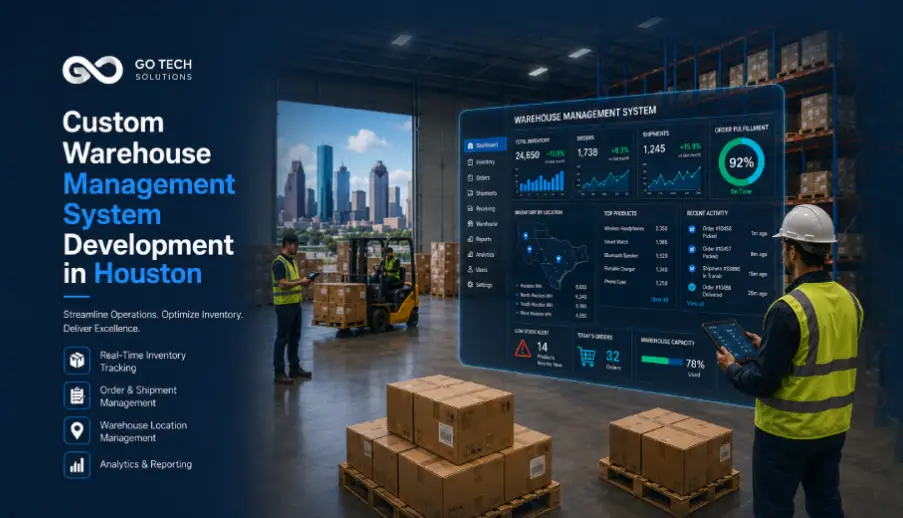
A warehouse management system is the software layer that controls how inventory moves through your facility from the moment a truck backs into the dock to the moment an order ships. Done well, it replaces spreadsheets, whiteboards, radios, and tribal knowledge with a single source of truth your whole team can trust.
A capable WMS handles:
- Receiving & put-away — logging inbound stock and directing it to the right location.
- Inventory control — real-time counts, lot/batch and expiry tracking, cycle counting.
- Picking & packing — optimized pick paths, wave/batch picking, pack verification.
- Shipping & fulfillment — carrier selection, label generation, order status.
- Reporting & analytics — throughput, accuracy, labor productivity, dashboards.
WMS vs TMS vs ERP — what’s the difference?
These three systems are constantly confused, and the confusion costs money when the wrong tool gets bought.
| System | What it manages | Core question it answers |
| WMS (Warehouse Management System) | What happens inside the four walls of the warehouse | “Where is my stock, and how do I get it out the door accurately?” |
| TMS (Transportation Management System) | Freight, carriers, routing, and shipments between locations | “How do I move goods from A to B at the lowest cost?” |
| ERP (Enterprise Resource Planning) | Company-wide finance, procurement, HR, and orders | “How is the whole business performing?” |
Most growing operations end up needing a WMS that integrates with an ERP and, later, a TMS not one system pretending to be all three.
How Much Does a Custom WMS Cost in 2026?
There’s no single price, because a WMS for a single-site distributor is a different animal than a platform for a multi-warehouse 3PL. But the market has settled into fairly consistent bands. Here’s how to think about it.
Cost bands by size and complexity
| Build tier | Typical profile | Indicative range | Timeline |
| Focused / single-site | One warehouse, core WMS modules, a couple of integrations | $70,000–$120,000 | ~8–14 weeks |
| Mid-market | Multiple locations or SKUs in the thousands, ERP + e-commerce integration, mobile scanning | $120,000–$250,000 | 4–7 months |
| Enterprise / automated | Multi-site, high volume, real-time analytics, EDI/carrier integrations, advanced automation | $250,000–$600,000+ | 6–12 months |
What actually drives the cost
In our experience, the budget is set by four things and screen count isn’t one of them:
- Integrations. Every ERP, accounting tool, e-commerce platform, carrier, and EDI partner “speaks a different dialect.” Each connection is real engineering the part of custom software development that most determines whether the finished system actually works. This is the single biggest cost driver in a WMS project.
- Number of sites and users. Multi-warehouse logic (transfers, cross-site visibility, location hierarchies) multiplies complexity across nearly every module.
- Real-time requirements. Live inventory and order tracking need a different web application architecture (event streaming, WebSockets/pub-sub) than a system that syncs every few minutes.
- Hardware and edge cases. Barcode scanners, label printers, mobile devices, and for advanced operations RFID and IoT all add to the total cost of ownership.
One thing that has moved in your favor: AI-assisted development now absorbs much of the commodity coding, so a bigger share of your budget goes toward engineering judgment on the four drivers above — not toward hand-writing routine screens. More on that below.
Custom build vs SaaS subscription: the 5-year math
This is where many teams get surprised. A packaged cloud WMS looks cheaper on day one, but for a mid-market operation the subscription commonly runs $8,000–$15,000 per month and that meter never stops. It also climbs as you add users, locations, and the customizations you inevitably need.
| Custom build | Off-the-shelf SaaS | |
| Upfront cost | Higher (one-time development) | Lower (setup + first subscription) |
| Ongoing cost | Hosting + maintenance | Per-user / per-warehouse subscription, forever |
| Fit to your workflow | Built around how you operate | You adapt to the software |
| Ownership | You own the code and data | You rent access |
| 5-year TCO at scale | Often lower once subscriptions compound | Often higher for complex, high-user operations |
The honest rule of thumb: at low volume and standard workflows, buy. Once subscriptions, per-seat fees, and forced workarounds start rivaling a one-time build — usually as you scale past a few locations or hit workflows the platform can’t model — custom wins on both fit and cost.
How AI Has Changed WMS Development — and What It Means for Your Timeline and Budget
A few years ago, building a warehouse system meant a team of developers writing every line of code by hand the login screen, the inventory logic, the boilerplate that wires one system to another, the tests, the documentation. That old, code-everything-manually model made even routine builds slow and expensive.
The economics have shifted. The model today is developer + AI: experienced engineers work alongside AI coding assistants that handle the repetitive, commodity parts of the build. The impact shows up clearly on the two things you care about most:
- Timeline. Work that used to eat weeks of hand-coding standard CRUD screens, routine API wiring, first-draft integrations, unit tests — now moves in days. That compresses the schedule, especially in the early build phases, and is a real reason a modern WMS ships faster than the same system would have in 2022.
- Cost. When engineers spend less time writing routine code, you pay for fewer of those hours. Just as importantly, more of your budget is redirected to the work that actually decides whether the system succeeds: your specific workflows, complex integrations, and real-time architecture.
Here’s the honest part that most “AI will just build it for you” pitches leave out: AI accelerates the easy 60% not the hard 40%. An AI assistant doesn’t understand your cross-dock rules, your 3PL billing logic, your cold-chain compliance, or how your dispatch and yard teams actually work at 6 a.m. Those decisions still require senior engineers who have built warehouse systems before. AI makes a good team faster and a build leaner; it does not replace domain expertise. Any vendor claiming AI lets them build your WMS for a fraction of the price is usually selling you a template, not a solution and templates are exactly what growing operations outgrow.
Bottom line for 2026: a custom WMS is genuinely faster to build and more cost-efficient than the same system was two or three years ago but the value still lives in the engineering judgment around integrations and operational fit. That’s where your budget should go, and it’s where the developer-plus-AI model lets it go. (We wrote more on this trade-off in Custom Software Development vs AI-First Development.)
Build vs Buy: When Off-the-Shelf WMS Stops Working
Nearly every custom WMS project we take on starts the same way: the client didn’t set out to build software. They bought a packaged system (or ran on spreadsheets), outgrew it, and hit a wall. The warning signs are consistent:
- Your team enters the same data into two or three systems because they won’t talk to each other.
- The packaged WMS can’t model a workflow that’s central to your business — your specific cross-dock rules, multi-vendor logic, cold-chain requirements, or an odd customer EDI spec.
- Subscription and per-user costs have quietly become one of your larger operating line items.
- You have multiple warehouses but no single, real-time view across them.
- “Customizing” the off-the-shelf tool now means expensive middleware and manual patches.
If two or more of those sound familiar, you’ve reached the point where the question shifts from convenience to control — and a custom build starts to pay for itself.
Integrations That Make or Break a WMS
A WMS that can’t exchange data cleanly with the rest of your stack isn’t a solution it’s another silo. The integrations that matter most:
- ERP / accounting (SAP, NetSuite, QuickBooks) so inventory and financials stay in sync.
- E-commerce (Shopify, WooCommerce, marketplaces) so online orders flow straight to the floor.
- Carriers & EDI — so shipping, labels, and trading-partner documents are automatic, not re-keyed.
- Existing hardware — scanners, printers, and mobile devices your staff already use.
Get these right and the WMS disappears into the background of a smooth operation. Get them wrong and you’ve spent six figures to create more manual work. This is exactly why integration expertise — not feature checklists — should drive your choice of development partner.
Timeline & Phases: What to Expect
A well-scoped custom WMS follows a predictable path:
- Operational audit & requirements (1–3 weeks). We map how you actually receive, store, pick, and ship — before writing a line of code. This step prevents the scope creep that kills WMS projects.
- Architecture & design (2–4 weeks). Data model, integrations plan, UI/UX for warehouse staff (who need speed and few clicks, not pretty dashboards).
- Build in phases (6–20+ weeks). Core modules first, then integrations, then workflow automation and analytics. You see working software early and often.
- Testing & pilot (2–4 weeks). Parallel QA throughout, plus a live pilot in one area before full rollout.
- Go-live & support. Guided training and a safety net during the critical first weeks. A focused build commonly reaches go-live in 8–12 weeks; larger platforms run longer. AI-assisted development has meaningfully shortened these phases versus the old hand-coded approach — most visibly in steps 2 and 3, where scaffolding, boilerplate, and first-draft integrations now come together in days rather than weeks.
Why Houston Warehouses Have Specific Requirements
Houston isn’t an average logistics and warehousing market, and its warehouses don’t have average software needs. The Port of Houston moves 300+ million tons of cargo a year and ranks among the busiest ports in the United States, feeding a dense network of distributors, 3PLs, fulfillment operators, and manufacturers across Harris County and the Katy–Sugar Land–Woodlands warehousing belt.
That creates real, local software requirements you won’t find fully addressed in a generic SaaS platform:
- High-volume, time-sensitive freight flowing from port to warehouse to customer.
- Multi-site operations as regional distributors scale across the metro the domain of enterprise-grade platforms.
- Cold-chain and food distribution with lot, batch, and expiry tracking.
- 3PL complexity — multiple clients, billing rules, and inventory owners under one roof.
- Integration with carrier and customs data feeds unique to a port city.
A development partner that understands the Houston operating environment and has actually shipped in it starts several steps ahead.
A Custom WMS We Built: Godaam Technologies
We don’t just write about warehouse systems we’ve built one end to end.
Godaam Technologies came to us needing a full warehouse management platform built from the ground up: multi-vendor support, a booking system, inventory control, and real-time analytics, all in one system. Their operation was complex from day one, spanning multiple vendors and warehouse teams.
What we built:
- A complete WMS on a modern, scalable stack React, Next.js, PostgreSQL, and AWS.
- 10+ core modules covering multi-vendor management, bookings, inventory control, and analytics.
- Real-time status notifications and analytics across the operation.
- Multi-entity tracking so the platform grows with the business.
The outcome: their vendors and warehouse teams adopted the system immediately the truest test of whether warehouse software actually fits the people using it. In the client’s words, we understood the complexity of their operations from day one and delivered a system built for how they really work.
How to Choose a WMS Development Company in Houston
A few questions that quickly separate a real product-engineering partner from a body shop:
- Have you actually built and launched a WMS? Ask for a case study, not a capabilities deck. (Ours is above.)
- How do you handle integrations? If they don’t lead with this, they’ll underestimate your project.
- Who manages the project, and in what timezone? Same-day communication matters when your warehouse is live.
- How do you bill? Milestone-based billing tied to deliverables protects you from paying for promises.
- What happens after go-live? Warehouse software that isn’t supported becomes a liability the moment something breaks at 6 a.m.
Frequently Asked Questions
How much does a custom WMS cost in Houston?
Most custom warehouse management systems fall between $70,000 and $250,000+, with large multi-site or automated builds reaching $200,000–$600,000+. The biggest cost driver is the number and complexity of integrations, not the number of features.
Should I build or buy a warehouse management system?
Buy if a packaged platform already fits about 80% of how you operate at your current scale. Build when integrations, multi-site logic, or workflows unique to your business force expensive workarounds or when subscription costs at scale start to rival a one-time build.
How long does it take to build a custom WMS?
A focused, well-scoped build commonly reaches go-live in 8–12 weeks. Larger enterprise platforms with multiple sites and integrations typically run 6–12 months.
Can a custom WMS integrate with my ERP and Shopify?
Yes. A custom system can connect to ERP and accounting tools (SAP, NetSuite, QuickBooks), e-commerce platforms (Shopify, WooCommerce), and carrier/EDI systems. Clean integration is the core of a successful WMS project.
What’s the difference between a WMS, a TMS, and an ERP?
A WMS manages operations inside the warehouse, a TMS manages transportation and freight between locations, and an ERP manages company-wide finance and operations. Most growing operations need a WMS that integrates with an ERP.
Is a custom WMS worth it versus a SaaS subscription?
For standard workflows at low volume, SaaS is usually the better value. As you add locations, users, and custom requirements, subscription costs compound and fit worsens — at which point a custom build often wins on both total cost and workflow fit.
Does AI make custom WMS development cheaper and faster?
Yes, to a point. With the developer-plus-AI model, engineers use AI coding assistants to handle routine, commodity code (standard screens, boilerplate, first-draft integrations, tests), which compresses timelines and reduces cost versus the old hand-coded approach. But AI accelerates the easy portion, not the hard part: your specific workflows, complex integrations, and real-time architecture still require senior engineers with warehouse-domain experience. Treat “AI builds your whole WMS cheaply” claims with caution.
What budget and timeline should we expect for a HIPAA-compliant healthcare app with EHR integration?
Cost and timeline are driven mostly by EHR integration (Epic/Cerner), HIPAA compliance work (audit logs, encryption, access controls), and any AI features like symptom triage. A focused MVP say a telemedicine or patient-engagement app is faster and cheaper than a full multi-integration platform. For budgeting, a typical HIPAA-compliant MVP with one EHR integration may cost around $75,000–$150,000, while a more complex multi-integration platform can range from $200,000–$500,000+.
What features should a warehouse management system include?
At minimum: receiving and put-away, real-time inventory control, optimized picking and packing, shipping and fulfillment, and reporting. Multi-site operations also need transfers, location hierarchies, and cross-site visibility.
Do warehouse staff need a mobile app?
Usually yes. Floor staff work fastest with a dedicated mobile app built for scanning designed for speed and minimal clicks, not desktop dashboards built for managers.
Get an Honest Build-vs-Buy Estimate
Weighing a custom WMS for your Houston operation? We built Godaam’s warehouse platform end to end, and we’ll give you a straight answer on whether you should build or buy before you spend a dollar on development.
Book a free 30-minute scoping call → and we’ll outline scope, a realistic cost band for your specific warehouse, and a written estimate within 24 hours. No pushy sales process. Just a real conversation with the people who build the software.