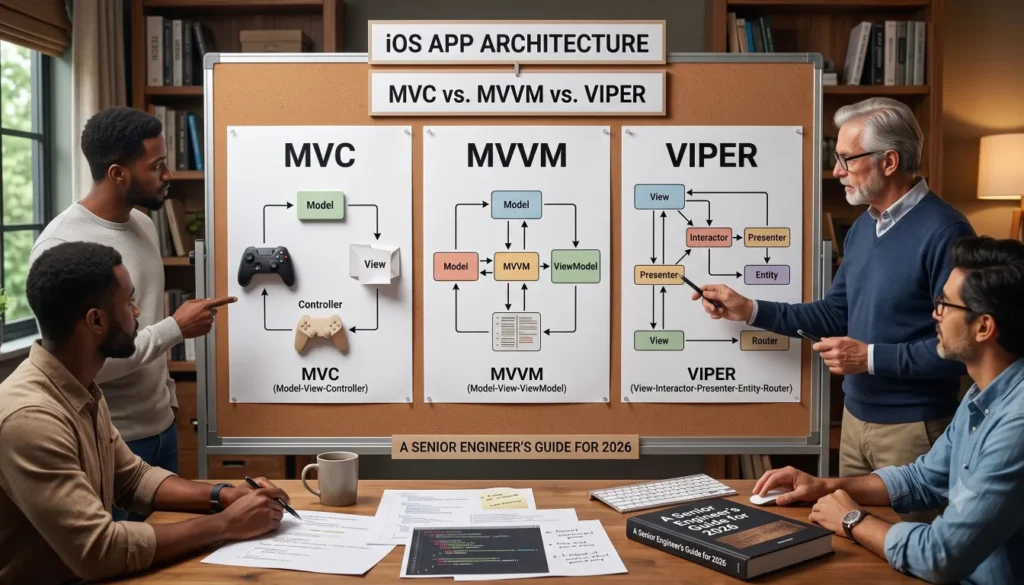
Choosing the right iOS app architecture is one of the most consequential decisions an engineering team makes long before the first screen ships. The pattern you pick quietly shapes how fast your team moves a year from now, how painful onboarding feels, how easy bugs are to isolate, and whether your codebase ages gracefully or collapses under its own weight. In Swift apps specifically, MVC vs MVVM vs VIPER is the comparison most teams keep coming back to, because each represents a different philosophy of how an iPhone application should be structured.
This guide is written for iOS developers, CTOs, engineering managers, and startup teams who want a practical, opinionated, engineering-focused breakdown of iOS architecture patterns not a textbook recital. If you’re just getting started, our guide on how to develop an iOS app in 2026 is a good companion read before diving into architecture decisions. By the end, you’ll know exactly when to use MVC, MVVM, or VIPER, how each compares for SwiftUI and UIKit, and how to structure a scalable iOS codebase that doesn’t fight you six months in.
What Is iOS App Architecture?
iOS app architecture is the high-level structural design that defines how the different parts of a Swift application data, UI, business logic, networking, persistence, and navigation communicate and depend on one another. In plain terms, it’s the blueprint that decides who is allowed to know about whom inside your codebase.
What Good Architecture Gives You
Good architecture in iOS development gives you four things:
- Separation of concerns — each layer has one clear job.
- Maintainability — changes in one area don’t cascade everywhere.
- Testability — business logic can be unit-tested without spinning up a UI.
- Scalability — adding a tenth screen doesn’t cost ten times more than the first.
Apple’s tooling Xcode, UIKit, SwiftUI, Combine gives you raw materials, but it deliberately stays unopinionated about how you assemble them. That freedom is why architecture choices matter so much, and it’s the same reason many teams follow structured mobile app development best practices from day one rather than retrofitting them later.
Quick answer: iOS app architecture is the structural pattern that organizes Swift code into layers typically separating data (Model), UI (View), and coordination logic (Controller, ViewModel, or Presenter) so the app stays maintainable, testable, and scalable as it grows.
Understanding MVC Architecture in iOS
What Is MVC?
Model–View–Controller (MVC) is the classical architectural pattern Apple has historically promoted as the default for UIKit development. It splits the application into three roles:
- Model — the data and business rules (e.g., a
Userstruct, aBookingService). - View — the UI elements the user sees (
UIView,UILabel,UITableViewCell). - Controller — the mediator that owns the view, listens to events, mutates the model, and updates the view (
UIViewController).
In Apple’s UIKit world, the UIViewController is the controller, and the relationship looks like this:
View ⇄ Controller (UIViewController) ⇄ ModelThe user taps a button → the view notifies the controller → the controller updates the model → the controller refreshes the view.
MVC in Practice (UIKit Example)
swift
// Model
struct User {
    let id: String
    var name: String
}

// View — usually configured inside the controller in classic MVC
final class ProfileView: UIView {
    let nameLabel = UILabel()
    let editButton = UIButton(type: .system)
}

// Controller
final class ProfileViewController: UIViewController {
    private var user: User
    private let profileView = ProfileView()

    init(user: User) {
        self.user = user
        super.init(nibName: nil, bundle: nil)
    }

    required init?(coder: NSCoder) { fatalError() }

    override func viewDidLoad() {
        super.viewDidLoad()
        view = profileView
        profileView.nameLabel.text = user.name
        profileView.editButton.addTarget(self, action: #selector(handleEdit), for: .touchUpInside)
    }

    @objc private func handleEdit() {
        user.name = "Updated Name"
        profileView.nameLabel.text = user.name
    }
}
Advantages of MVC in iOS
- Low learning curve — every iOS tutorial uses it.
- Fast to prototype — minimal boilerplate for small screens.
- Apple-native — UIKit, Storyboards, and segues are designed around it.
- Great for small apps and MVPs.
The “Massive View Controller” Problem
Where MVC in iOS breaks down is when the controller silently absorbs everything: networking, formatting, navigation, validation, animations, state. Developers joke that MVC in Apple’s interpretation often becomes Massive View Controller a single UIViewController with 1,500+ lines that’s nearly impossible to test or refactor.
This single issue is why the conversation around MVC vs MVVM in iOS dominates engineering discussions today. Most teams don’t abandon MVC because it’s wrong they abandon it because the controller layer has no natural ceiling.
Understanding MVVM Architecture in iOS
What Is MVVM?
Model–View–ViewModel (MVVM) introduces a fourth participant the ViewModel between the View and the Model. The ViewModel takes over everything the View shouldn’t know about: formatting, state management, business rules for the screen, and reacting to data changes.
The flow becomes:
View ⇄ ViewModel ⇄ ModelThe ViewModel exposes observable properties (via @Published, Combine, or @Observable), and the View binds to them. The View becomes a thin reflection of the ViewModel’s state exactly what SwiftUI was designed for.
Why MVVM Took Over Modern Swift Development
The rise of SwiftUI and Combine made MVVM the most natural fit for modern iOS architecture. SwiftUI views are declarative they describe what the UI should look like given some state. That maps directly onto a ViewModel that owns and publishes that state, which is also why so many teams pair it with the mobile application development workflows built around SwiftUI today.
MVVM with SwiftUI and Combine
swift
import SwiftUI
import Combine

// Model
struct Article {
    let id: UUID
    let title: String
    let body: String
}

// ViewModel
@MainActor
final class ArticleListViewModel: ObservableObject {
    @Published private(set) var articles: [Article] = []
    @Published private(set) var isLoading = false
    @Published private(set) var errorMessage: String?

    private let service: ArticleServicing

    init(service: ArticleServicing) {
        self.service = service
    }

    func load() async {
        isLoading = true
        defer { isLoading = false }
        do {
            articles = try await service.fetchArticles()
        } catch {
            errorMessage = error.localizedDescription
        }
    }
}

// View
struct ArticleListView: View {
    @StateObject private var viewModel: ArticleListViewModel

    init(viewModel: ArticleListViewModel) {
        _viewModel = StateObject(wrappedValue: viewModel)
    }

    var body: some View {
        List(viewModel.articles, id: \.id) { article in
            VStack(alignment: .leading) {
                Text(article.title).font(.headline)
                Text(article.body).font(.subheadline)
            }
        }
        .overlay { if viewModel.isLoading { ProgressView() } }
        .task { await viewModel.load() }
    }
}
Notice how the View has zero business logic. That’s the entire point of the MVVM pattern in iOS the View becomes disposable, the ViewModel becomes testable, and the Model stays clean.
MVVM with UIKit
You don’t need SwiftUI to use MVVM. UIKit teams commonly pair MVVM with Combine or RxSwift:
swift
final class ProfileViewModel {
    @Published var displayName: String = ""
    @Published var isVerified: Bool = false

    private var cancellables = Set<AnyCancellable>()
    private let userService: UserServicing

    init(userService: UserServicing) {
        self.userService = userService
    }

    func bind() {
        userService.currentUserPublisher
            .map { $0.fullName }
            .assign(to: &$displayName)
    }
}
Advantages of MVVM Architecture in iOS
- Highly testable — ViewModels are pure Swift objects.
- Perfect fit for SwiftUI and Combine.
- Eliminates the Massive View Controller anti-pattern.
- Clean separation between UI and presentation logic.
- Easier to onboard new engineers than VIPER.
Drawbacks
- More boilerplate than MVC for trivial screens.
- Risk of “Massive ViewModels” if you don’t enforce discipline.
- Binding can feel implicit for engineers new to reactive patterns.
MVVM is the architecture pattern most modern Swift teams default to in 2026 especially anyone building primarily in SwiftUI.
Understanding VIPER Architecture in iOS
What Is VIPER?
VIPER is a stricter, more modular iOS architecture pattern named after its five components:
- View — UIKit/SwiftUI display layer.
- Interactor — business logic and data fetching for a screen.
- Presenter — formats data for the view; mediates between view and interactor.
- Entity — pure data models.
- Router (sometimes called Wireframe) navigation between modules.
Where MVVM has one “extra” layer, VIPER has three. Each screen is a module with its own complete set of components, communicating through protocols.
VIPER Module Structure
A typical VIPER module looks like this on disk:
LoginModule/
├── LoginView.swift
├── LoginPresenter.swift
├── LoginInteractor.swift
├── LoginRouter.swift
├── LoginEntity.swift
└── LoginContracts.swift   // protocols defining interactions
Why VIPER Exists
VIPER was born in large iOS teams (originally at Mutual Mobile) where dozens of engineers were stepping on each other’s view controllers daily. By forcing every screen into the same five-component shape, VIPER trades ceremony for predictability:
- New engineers know exactly where to put code.
- Modules can be parallelized across teams.
- Unit tests are straightforward every component has a single responsibility.
- Navigation is centralized in Router, so flow logic doesn’t leak.
When VIPER Becomes Worth the Cost
VIPER shines in:
- Enterprise mobile architecture with 50+ screens.
- Banking, insurance, healthcare, and travel apps with heavy compliance and audit requirements.
- Teams of 10+ iOS engineers working in parallel.
- Long-lived codebases with 5-year+ horizons.
For a 5-screen MVP, VIPER is almost always overkill. The VIPER vs MVVM debate in iOS often comes down to this: VIPER pays off when team size and screen count are large enough that the boilerplate cost is smaller than the coordination cost it saves. If you’re weighing this trade-off for your own product, our technical consultancy team can help assess which pattern fits your roadmap.
Simplified VIPER Example
swift
// Contracts
protocol LoginViewProtocol: AnyObject {
    func show(errorMessage: String)
    func showLoading(_ isLoading: Bool)
}

protocol LoginPresenterProtocol: AnyObject {
    func didTapLogin(email: String, password: String)
}

protocol LoginInteractorProtocol: AnyObject {
    func authenticate(email: String, password: String) async throws -> User
}

protocol LoginRouterProtocol: AnyObject {
    func navigateToHome()
}

// Presenter
final class LoginPresenter: LoginPresenterProtocol {
    weak var view: LoginViewProtocol?
    var interactor: LoginInteractorProtocol?
    var router: LoginRouterProtocol?

    func didTapLogin(email: String, password: String) {
        view?.showLoading(true)
        Task {
            do {
                _ = try await interactor?.authenticate(email: email, password: password)
                await MainActor.run {
                    view?.showLoading(false)
                    router?.navigateToHome()
                }
            } catch {
                await MainActor.run {
                    view?.showLoading(false)
                    view?.show(errorMessage: error.localizedDescription)
                }
            }
        }
    }
}
The verbosity is the trade-off. The benefit is that every engineer on the team knows exactly where authentication logic lives, where navigation lives, and where UI lives with no ambiguity.
MVC vs MVVM vs VIPER Core Differences
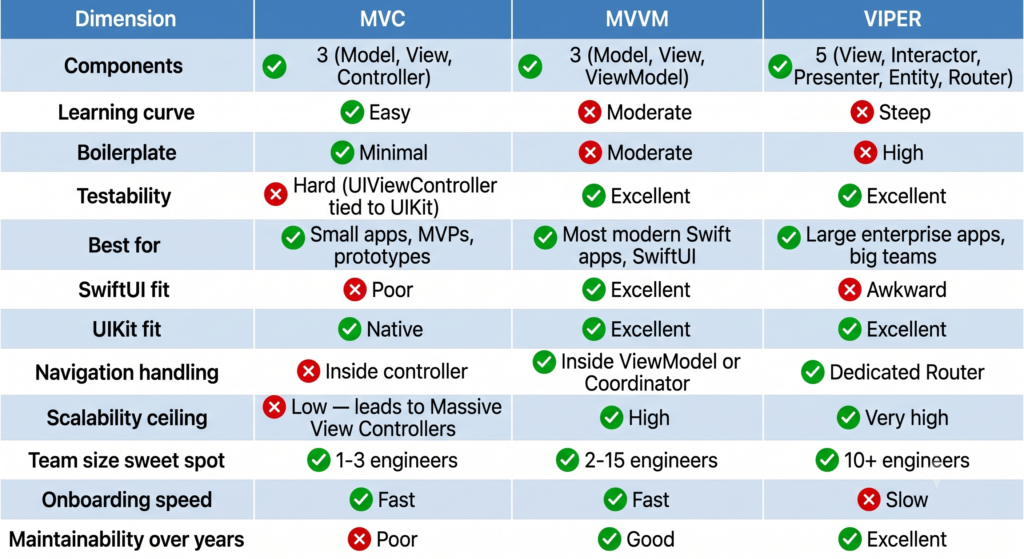
Here’s the comparison most engineering teams actually need when deciding between the three:
Performance Considerations
In raw runtime performance, there is essentially no measurable difference between MVC, MVVM, and VIPER. They are organizational patterns, not performance patterns. The performance impact is indirect through code clarity, bug rates, and how quickly engineers can ship optimizations.
The one nuance: heavy use of Combine subscriptions or RxSwift in MVVM can introduce subtle memory or retain-cycle issues if mismanaged. Use [weak self] carefully and prefer assign(to:) over assign(to:on:) for @Published properties.
Engineering consultation tip: If your team is debating architecture today and shipping in six months, you should be choosing between MVVM and VIPER not MVC. For most teams, MVVM is the right answer. For more on choosing the right pattern for your specific app, see our mobile application development team’s architectural assessment process.
Which Architecture Is Best for SwiftUI?
If your app is being built primarily in SwiftUI, the answer is almost always MVVM and it’s not particularly close.
SwiftUI is built around three core ideas:
- Declarative UI — describe state, not steps.
- Single source of truth — state lives in one place.
- Property wrappers —
@State,@StateObject,@ObservedObject,@Bindable,@Environment.
These map directly onto MVVM: a SwiftUI View is the View, an ObservableObject (or @Observable macro in Swift 5.9+) is the ViewModel, and your data structs are the Model.
swift
@Observable
final class CartViewModel {
    var items: [CartItem] = []
    var total: Decimal { items.reduce(0) { $0 + $1.price } }

    func add(_ item: CartItem) { items.append(item) }
    func remove(at index: Int) { items.remove(at: index) }
}
VIPER, by contrast, fights SwiftUI’s grain. The Router pattern overlaps awkwardly with SwiftUI’s NavigationStack, and the Presenter layer duplicates what @Observable already does. Some enterprise teams still force VIPER onto SwiftUI, but it’s friction without much reward.
Recommendation for SwiftUI apps: MVVM with @Observable, plus a lightweight Coordinator pattern for navigation (sometimes called MVVM-C). Add Clean Architecture layering once your app exceeds ~30 screens.
Clean Architecture in iOS Explained
Clean Architecture isn’t an alternative to MVVM or VIPER it’s a complementary set of principles you can layer on top of either. It was formalized by Robert C. Martin and adapted heavily by the iOS community.
The Core Idea
Clean Architecture organizes your codebase into concentric layers, where inner layers don’t know about outer layers:
┌─────────────────────────────────────────────┐
│ Presentation (Views, ViewModels)            │
│  ┌─────────────────────────────────────┐    │
│  │ Domain (Use Cases, Entities)        │    │
│  │  ┌──────────────────────────────┐   │    │
│  │  │ Data (Repositories, APIs)    │   │    │
│  │  └──────────────────────────────┘   │    │
│  └─────────────────────────────────────┘    │
└─────────────────────────────────────────────┘- Domain layer — pure Swift, no UIKit, no networking. Contains entities and use cases (
LoginUseCase,FetchArticlesUseCase). - Data layer — implements repositories that the domain layer depends on via protocols.
- Presentation layer — Views and ViewModels that consume use cases.
Why Clean Architecture Matters in iOS
- Dependency inversion — your domain logic doesn’t depend on Alamofire, Firebase, or CoreData.
- Swappable infrastructure — replace REST with GraphQL without touching business rules.
- Modular iOS app architecture — each layer can become its own Swift Package.
- Testability — use cases are trivially mockable.
Example: Use Case Pattern
swift
// Domain
protocol AuthRepository {
    func login(email: String, password: String) async throws -> User
}

struct LoginUseCase {
    let repository: AuthRepository

    func execute(email: String, password: String) async throws -> User {
        guard email.contains("@") else { throw ValidationError.invalidEmail }
        return try await repository.login(email: email, password: password)
    }
}

// Presentation (ViewModel uses the use case, not the repository)
@MainActor
final class LoginViewModel: ObservableObject {
    private let loginUseCase: LoginUseCase
    // …
}
This combination MVVM + Clean Architecture + Swift Packages is what most senior iOS architects recommend in 2026 for serious production apps, and it aligns closely with the customized development solutions approach many growth-stage teams adopt.
iOS Project Structure Best Practices
A great architecture pattern can still ship a messy codebase if the iOS project structure is wrong. These best practices tie directly into the broader mobile app development best practices for 2026 that senior teams converge on.
1. Feature-Based Folders, Not Type-Based
❌ Avoid:
/ViewControllers
/Views
/Models
/Networking
✅ Prefer:
/Features
   /Authentication
      /Login
      /Signup
      /ForgotPassword
   /Profile
   /Feed
/Core
   /Networking
   /Persistence
   /DesignSystem
Feature-based structure scales because adding a feature means adding a folder — not editing five folders.
2. Use Swift Packages for Modularity
Break out core features into local Swift Packages:
MyApp.xcworkspace
├── MyApp (iOS target)
└── Packages/
    ├── DesignSystem
    ├── Networking
    ├── Authentication
    └── Analytics
Benefits: faster builds, enforced boundaries, parallel team work.
3. Dependency Injection From Day One
Don’t reach for singletons. Inject dependencies via initializers, and use a lightweight container (or swift-dependencies by Point-Free) for app-wide services.
4. Coordinator Pattern for Navigation
Especially in UIKit, never let view controllers push other view controllers directly. Coordinators (or VIPER Routers) keep navigation logic out of UI code.
5. Shared Services and Protocols
Define protocols in the domain layer. Implement them in the data layer. Inject implementations at the composition root (usually AppDelegate or App).
6. Naming Conventions
Pick a convention and enforce it: LoginView, LoginViewModel, LoginUseCase, LoginRepository. Avoid abbreviations like UsrVM.
These practices look obvious in hindsight, but the apps that scale gracefully are almost always the ones that committed to them early.
MVC to MVVM Migration Guide
Migrating from MVC to MVVM in Swift is one of the most common refactors iOS teams take on as their app outgrows its original structure.
Why Teams Migrate
- View controllers exceed 800–1,000 lines.
- Unit test coverage stalls below 20% because logic is trapped in
UIViewControllers. - New features take 2–3× longer than they used to.
- Onboarding new engineers feels painful.
Step-by-Step Refactoring Strategy
- Identify the heaviest controller. Pick the one screen that hurts the most. Don’t migrate everything at once.
- Extract a ViewModel as a plain Swift class. Move formatting, state, and business calls out of the controller into the new ViewModel.
- Replace properties with
@Published(Combine) or@Observable. This is where binding starts to feel natural. - Inject dependencies into the ViewModel. Networking, persistence, analytics all should arrive via the initializer, not be reached from singletons.
- Bind the view to the ViewModel. In UIKit, subscribe via Combine. In SwiftUI, use
@StateObjector@Bindable. - Write tests for the ViewModel. This is the payoff your new ViewModel should be trivially testable.
- Repeat for the next screen.
Common Migration Mistakes
- Trying to migrate the whole app in one pull request. Keep MVC and MVVM coexisting; migrate incrementally.
- Letting the ViewModel hold UIKit types. A ViewModel should never import UIKit.
- Skipping dependency injection. Without DI, your “ViewModel” is just a renamed view controller.
- Replacing Massive View Controllers with Massive ViewModels. Split by feature or use case.
The MVC-to-MVVM journey isn’t really about renaming files. It’s about moving from imperative state mutation to declarative, observable state.
Best Architecture for Startups vs Enterprise Apps
There is no single right answer to “what is the best architecture for iOS apps” but there is a right answer for your context.
Startups Building MVPs
Recommendation: MVVM with SwiftUI, minimal Clean Architecture, no VIPER.
- You need to ship fast and iterate based on user feedback.
- Your codebase is small enough that strict modularization adds cost without payoff.
- Hire decisions and pivots can change your stack overnight; don’t over-invest in structure.
A typical startup iOS project in 2026 looks like: SwiftUI as the UI layer, @Observable ViewModels, a single networking layer using async/await and URLSession, light dependency injection, and a feature-based folder structure. If you’re just starting this journey, our walkthrough on how to develop an iOS app in 2026 covers the end-to-end process.
Growth-Stage Companies (15+ screens, 3–8 engineers)
Recommendation: MVVM + Clean Architecture + Swift Packages + Coordinator pattern.
- Start modularizing into local Swift Packages.
- Introduce use cases in a Domain layer.
- Adopt the Coordinator pattern for navigation.
- Establish testing standards (target ~70% coverage on ViewModels and use cases).
Enterprise iOS Teams
Recommendation: MVVM or VIPER + Clean Architecture + heavy modularization.
- VIPER becomes worth the boilerplate when 10+ iOS engineers work in parallel.
- Each module should compile independently.
- CI/CD pipelines should run module-specific test suites.
- Architectural decisions become written ADRs (Architecture Decision Records).
Need help making this call for your team? Our enterprise application practice has migrated dozens of apps from legacy MVC into modern architectures we can audit your codebase and recommend the right pattern.
Common Mistakes in iOS Architecture Design
After reviewing dozens of production iOS codebases, the same architecture mistakes show up again and again:
- Overengineering too early — Adopting VIPER for a 3-screen MVP. The cost of boilerplate compounds; ship MVC or MVVM first.
- Massive View Controllers (and now Massive ViewModels) — Any class over ~300 lines deserves scrutiny. Split by responsibility.
- Tight coupling to UIKit or SwiftUI — ViewModels should not import UIKit or SwiftUI. If they do, you’ve leaked the UI layer into your business logic.
- Singleton abuse —
NetworkManager.shared,AnalyticsManager.shared,UserSession.shared— every singleton is a hidden dependency that breaks testability and modularity. - No dependency injection — Without DI, every test requires running the whole app. Invest in DI from day one.
- Ignoring navigation as a concern — Letting view controllers push other view controllers directly creates an invisible navigation graph. Use Coordinators or Routers.
- Mixing architecture patterns inconsistently — Half the app in MVC, half in MVVM, with no migration plan. Pick a direction and migrate consistently.
- Skipping the domain layer — Putting business rules directly in ViewModels. The moment you need to reuse logic across screens, you’ll regret it.
Prevention Strategy
- Code reviews enforce architecture rules.
- Linting tools (SwiftLint, custom rules) catch violations.
- Architecture Decision Records document trade-offs.
- A small “architecture council” approves cross-cutting decisions.
The Future of iOS Architecture in 2026
The architectural landscape has shifted meaningfully over the past two years, and several trends are now obvious:
- SwiftUI has won the new-project default. Most greenfield iOS apps started in 2025–2026 are SwiftUI-first. UIKit remains essential for legacy apps and edge cases, but SwiftUI is the default.
- The
@Observablemacro simplifies MVVM. It replaces much of theObservableObject+@Publishedboilerplate. Modern MVVM is leaner than ever. - Modular architecture via Swift Packages is standard. Even mid-sized apps now ship as multiple local Swift Packages.
- The Composable Architecture (TCA) is a real contender. Point-Free’s TCA offers a Redux-inspired approach to state management, gaining adoption in teams that value strict state predictability.
- AI-assisted code organization is becoming part of the standard iOS toolchain.
- Reactive architecture continues to dominate — Combine, async sequences, and observation push teams further toward MVVM and away from MVC.
- VIPER adoption is flat or declining. Outside specific enterprise contexts, VIPER’s boilerplate is increasingly seen as not worth the cost.
Final Verdict MVC vs MVVM vs VIPER
Use MVC if:
- You’re building a small, short-lived app.
- You’re learning iOS development.
- You’re prototyping a quick UIKit demo.
- Your team is one engineer and the project is genuinely tiny.
Use MVVM if:
- You’re building in SwiftUI (almost always the right answer).
- Your team is 2–15 engineers.
- You want testability without crushing boilerplate.
- You’re starting a new iOS project in 2026 with no specific constraint pulling you elsewhere.
Use VIPER if:
- Your team has 10+ iOS engineers working in parallel.
- You’re building an enterprise app in banking, insurance, healthcare, or similar regulated domains.
- The app will live for 5+ years.
- You have the engineering discipline to maintain the boilerplate.
Use Clean Architecture (with MVVM or VIPER) if:
- Your app has 30+ screens.
- You want to modularize via Swift Packages.
- You expect to swap data sources or major dependencies over time.
For 80% of iOS teams reading this in 2026, the answer is: MVVM + SwiftUI + Clean Architecture, organized into Swift Packages. It’s the modern Swift architecture sweet spot balanced, scalable, testable, and aligned with where Apple’s platform is heading.
FAQ
What is the best architecture for iOS apps? For most iOS apps in 2026, MVVM is the best architecture, especially when paired with SwiftUI and Combine. For very large enterprise apps with 10+ engineers, VIPER or Clean Architecture may be more appropriate.
What is MVC in iOS development? MVC (Model–View–Controller) is Apple’s traditional iOS architecture pattern. The Model holds data, the View displays the UI, and the Controller (UIViewController) coordinates between them. It’s simple and beginner-friendly but often leads to “Massive View Controllers” in larger apps.
What is MVVM architecture in Swift? MVVM (Model–View–ViewModel) is a Swift architecture pattern that adds a ViewModel layer between the View and Model. The ViewModel exposes observable state and presentation logic, letting the View remain thin. It’s the recommended pattern for SwiftUI and modern iOS development.
When should you use VIPER architecture? Use VIPER when building large enterprise iOS apps with 10+ engineers, long lifespans, and strict modularity requirements. For smaller apps, it’s usually overkill.
Is MVVM better than MVC in iOS? For most modern iOS projects, yes MVVM improves testability, eliminates Massive View Controllers, and integrates cleanly with SwiftUI and Combine. MVC remains fine for small apps and learning projects.
Why do developers use VIPER architecture? For strict separation of concerns, parallel team workflows, and long-term maintainability in enterprise iOS apps.
Which iOS architecture is easiest to maintain? MVVM with Clean Architecture is generally the easiest to maintain at scale, offering strong separation of concerns without VIPER’s heavy boilerplate.
What architecture does Apple recommend for iOS apps? Apple historically promoted MVC for UIKit, but SwiftUI’s property wrappers and observation system strongly favor MVVM patterns in practice.
How do you structure a scalable iOS app? Use MVVM or Clean Architecture, organize code by feature, modularize via Swift Packages, apply dependency injection, separate navigation into Coordinators, and write unit tests for ViewModels and use cases.
Is Clean Architecture good for iOS apps? Yes especially for mid-to-large codebases, where it enables dependency inversion, swappable infrastructure, and superior testability.
Conclusion Build the Architecture Your Future Team Will Thank You For
iOS app architecture isn’t an academic concern it’s a business decision wearing engineering clothes. The pattern you choose today shapes your team’s velocity for years. MVC will get you off the ground fast. MVVM will carry you through scale. VIPER will hold up under the weight of an enterprise. Clean Architecture layered on top of any of them keeps your business logic from drowning in framework-specific code.
The most successful iOS teams aren’t the ones obsessed with picking the “perfect” pattern. They’re the ones who pick a sensible default usually MVVM with SwiftUI in 2026 apply it consistently, modularize as they grow, and treat architecture as an evolving conversation rather than a one-time decision.
Need an expert second opinion? If you’re choosing an architecture for a new iOS app, migrating from legacy MVC, or scaling into enterprise territory, our senior iOS architects can review your codebase and recommend the right pattern for your stage. Explore our mobile application development services or read more on mobile app development best practices for 2026.