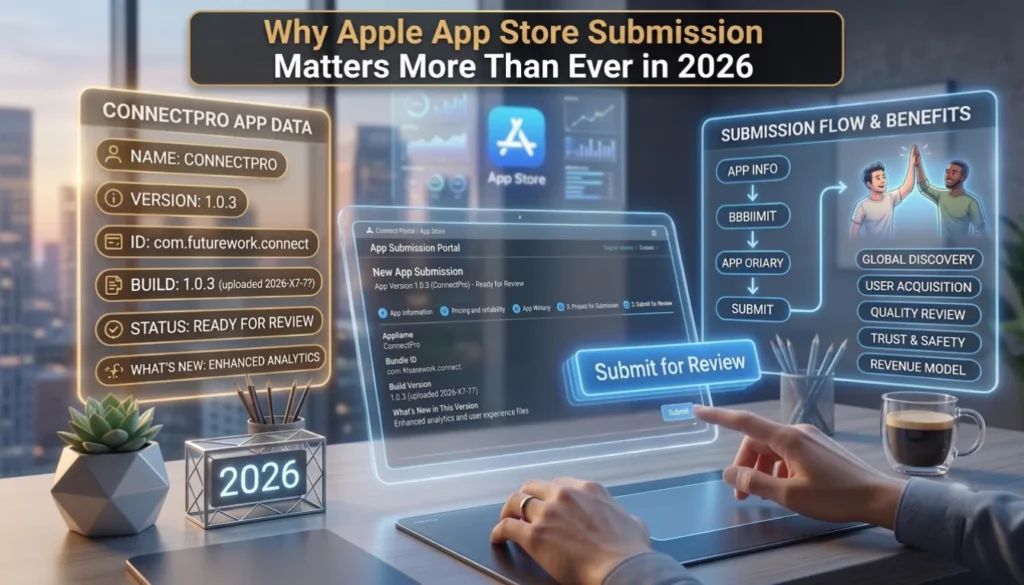
Launching an iOS app in 2026 is no longer just a technical milestone it’s a strategic business decision. The Apple App Store now reaches more than a billion active users across iPhone, iPad, Mac, Apple Vision Pro, and Apple Watch, and it remains the highest-revenue mobile marketplace on the planet. For startups, SaaS companies, enterprises, and indie developers, getting an app accepted into this ecosystem is often the difference between a product that scales and one that quietly disappears.
But here’s the catch: Apple’s review standards have evolved significantly. In late 2025 and early 2026, Apple updated its App Review Guidelines to address creator apps, AI-generated content, mini apps, and stricter age-verification mechanisms. Beginning April 28, 2026, Apple now mandates that every new submission and update be built using the iOS 26, iPadOS 26, tvOS 26, visionOS 26, or watchOS 26 SDK. Add the EU’s transition from the Core Technology Fee (CTF) to the Core Technology Commission (CTC), new US state App Store Accountability Laws, the Declared Age Range API, App Tracking Transparency enforcement, and tighter privacy-label scrutiny, and the apple app store submission process now demands much more than clean code.
This is exactly where most teams struggle. Roughly 40% of first-time submissions get rejected, often for issues as simple as a broken link or a misleading screenshot. Founders lose weeks chasing back-and-forth review feedback when they could have launched in days.
If you’re still deciding how to build your app before you even get to submission, our guide on how to develop an iOS app in 2026 walks through the planning and development stages that come before this one. And if your roadmap spans both platforms, our mobile app development best practices for 2026 is a useful companion read.
This guide walks you through everything you need to know to submit an iOS app to the App Store in 2026 from setting up an Apple Developer account to uploading your build through Xcode, navigating App Store Connect, surviving Apple Review, and ranking after launch. Whether you’re a solo developer publishing your first iPhone app or a CTO planning an enterprise rollout, this is the playbook.
What Is the Apple App Store Submission Process?
The Apple App Store submission process is the structured workflow Apple uses to verify, review, and publish every iOS app before it becomes available to users worldwide. It involves five core stages: enrollment, app preparation, build upload, App Store Connect configuration, and Apple Review.
At a high level, the lifecycle looks like this:
- Enroll in the Apple Developer Program.
- Build and code-sign your app in Xcode using current SDKs.
- Archive and upload the build to App Store Connect.
- Configure listing metadata: screenshots, descriptions, keywords, pricing, privacy labels, and age rating.
- Submit for review Apple’s automated systems and human reviewers evaluate compliance.
- Receive a status update: Ready for Sale, In Review, Pending Developer Release, or Rejected.
- Release publicly, in phases, or hold for a manual release.
Every update even a one-button UI change goes through this same approval pipeline. That’s why understanding the workflow end-to-end isn’t optional. It’s the foundation of every successful App Store launch.
Key takeaway: App Store submission is a process, not a single action. Treat it like a release engineering pipeline, not a final upload.
Apple App Store Submission Requirements (2026)
Apple’s submission requirements have tightened in 2026, especially around privacy, AI, and platform support. Before you upload anything, your team should have the following ready.
Core Technical Requirements
- An active Apple Developer Program membership.
- The latest stable version of Xcode (Xcode 26 recommended in 2026).
- Apps built with iOS 26, iPadOS 26, tvOS 26, visionOS 26, or watchOS 26 SDKs Apple’s enforced minimum for all new submissions and updates starting April 28, 2026 (watchOS apps must also include 64-bit support).
- Valid distribution certificates and provisioning profiles generated through your Apple Developer account.
- A unique Bundle Identifier (Bundle ID) registered in App Store Connect.
- A signed, archived .ipa build ready for upload.
Listing & Compliance Requirements
- A live privacy policy URL that accurately reflects your data practices.
- Complete App Privacy Labels in App Store Connect every data type your app collects must be declared.
- App Tracking Transparency (ATT) prompt if your app tracks users across other apps or websites.
- Properly configured In-App Purchases for any digital goods or subscriptions.
- A support URL with active, monitored contact information.
- Localized metadata for every region you publish in.
Visual & Metadata Assets
- App icon in all required resolutions (1024×1024 store icon plus in-app sizes).
- Screenshots for every supported device size (iPhone 6.7″, 6.5″, iPad 12.9″, and Apple Vision Pro if relevant).
- App preview videos (optional but strongly recommended).
- Compelling app name, subtitle, description, keywords, and promotional text.
- Accurate age rating based on Apple’s questionnaire.
Submission Checklist Table
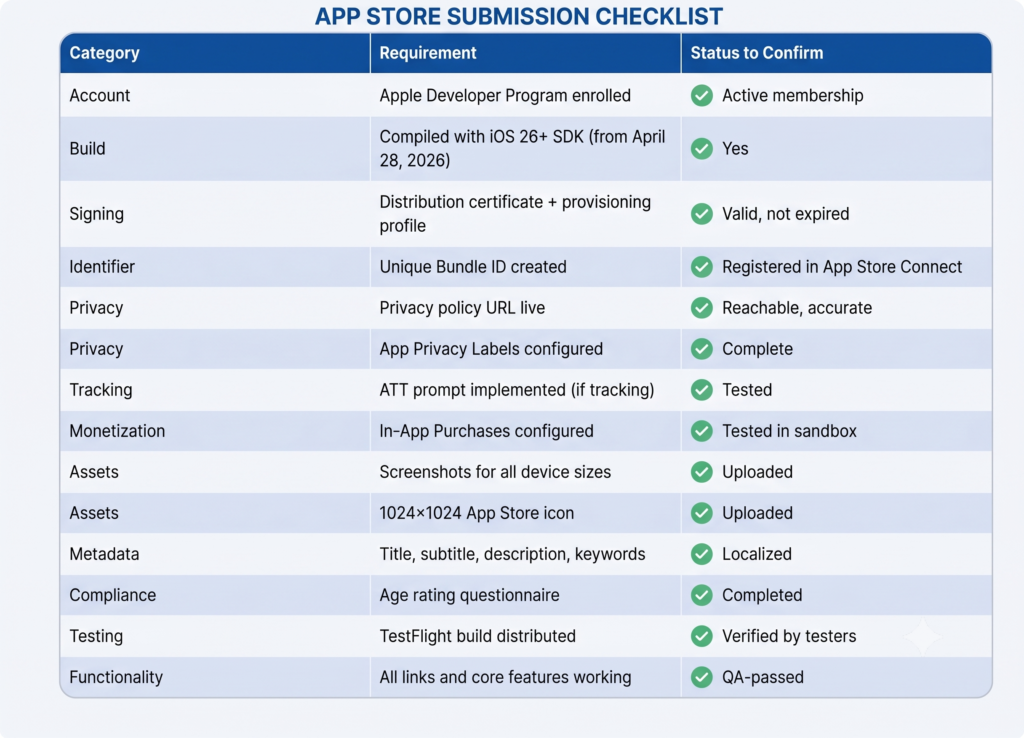
Pro tip: Build this checklist into your CI/CD release process. Teams that automate compliance checks reduce first-submission rejections by more than half.
How to Set Up an Apple Developer Account
Setting up an Apple Developer account is the single most important step in the apple developer app submission journey and the one most often delayed. Here’s how to do apple developer account setup properly, the first time.
Individual vs Organization Accounts
Apple offers three primary enrollment paths:
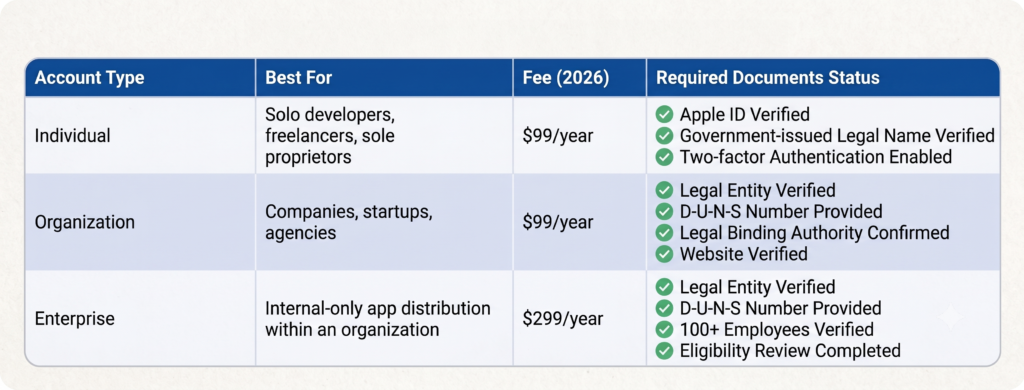
Choose Organization if you plan to publish under a brand name, collaborate with multiple developers, or sell B2B. Choose Enterprise only if you’re distributing internal apps that will never reach the public App Store.
Nonprofits, accredited educational institutions, and government entities can apply for a fee waiver and avoid the annual $99 charge entirely.
Verification Process
Apple verifies every applicant before activating an account. For organizations, you’ll need a valid D-U-N-S Number from Dun & Bradstreet request one for free from Apple’s enrollment portal if you don’t have one. Apple verifies your legal name, address, phone, and your authority to bind the organization to legal agreements. Verification typically takes 24-48 hours but can stretch to two weeks during peak periods like WWDC.
Common Setup Mistakes to Avoid
- Using a nickname or DBA instead of a legal name (instant delay).
- Listing a P.O. box as your business address (not accepted).
- Enrolling under an executive’s personal Apple ID instead of a dedicated company Apple ID.
- Forgetting to enable two-factor authentication before starting enrollment.
- Mismatched details between your D-U-N-S record and your Apple application.
Expert insight: Treat your Apple Developer account like financial infrastructure. The Account Holder controls everything billing, certificates, app ownership. Use a dedicated company-controlled Apple ID, not a personal one, and document recovery procedures from day one.
Prepare Your iOS App Before Submission
The smoothest App Store submissions happen because teams treat the days before upload as their final QA gate. The submission isn’t where you find bugs
it’s where Apple finds bugs you missed. For a deeper walkthrough of the build phase itself, see our guide on how to develop an iOS app in 2026.
Testing on Real Devices
Simulators are useful, but they will never catch what real hardware reveals. Test on at least one current iPhone, one older iPhone (iOS 26 minimum), and one iPad. If your app supports Vision Pro, test on the device or in Reality Composer Pro. Apple reviewers test on real devices and frequently reject apps that crash or lag on older hardware.
Performance & Crash Prevention
- Run Xcode Instruments to profile memory leaks, CPU spikes, and battery drain.
- Set up crash reporting (Apple’s built-in tools, Sentry, or Crashlytics).
- Target a launch time under 2 seconds on mid-tier devices.
- Eliminate every blocking main-thread call.
Security Testing
- Validate all certificate pinning and HTTPS connections.
- Remove all hardcoded secrets, API keys, and tokens from the build.
- Audit any third-party SDK for data collection that contradicts your privacy labels.
- Test deep links and universal links for spoofing risks.
UX, Accessibility & Localization Checks
Apple weighs user experience heavily in 2026. Run a final pass with VoiceOver enabled, ensure dynamic type scales correctly, and verify dark mode parity. Localize at minimum your title, subtitle, screenshots, and description for every region you target. If accessibility and interface polish aren’t your team’s strength, our UI/UX design services can help you close those gaps before submission.
App Store Metadata Optimization
Before submission, write metadata that actually converts:
- App title (30 chars max): Brand name + one strong keyword.
- Subtitle (30 chars max): Clear value proposition.
- Promotional text (170 chars): Updatable without resubmission use it for new features or seasonal hooks.
- Description: First three lines matter most that’s what users see before tapping “more.”
- Keywords field (100 chars): Comma-separated, no spaces wasted, no competitor names.
Mid-content CTA: Planning a complex enterprise launch or a high-stakes consumer release? Working with experienced mobile application development services can compress your time-to-approval and avoid costly first-submission rejections.
How to Upload an iOS App to App Store Using Xcode
This is the technical heart of the process. Here’s exactly how to xcode publish app to app store in 2026, step by step.
Step 1: Set Build Configuration to Release
In Xcode, select your project, choose your scheme, and edit the scheme settings. Confirm the Run configuration is set to Release for archive builds. Debug builds will fail validation.
Step 2: Update Version & Build Numbers
Open your target’s General tab. Increment the Version (CFBundleShortVersionString) for any user-facing change. Increment the Build (CFBundleVersion) every single upload even for re-uploads of the same version.
Step 3: Verify Signing & Capabilities
Under Signing & Capabilities, confirm Automatically manage signing is enabled (or that your manual provisioning profile is current).
- Ensure the Team is set to your organization, not a personal team.
- Verify entitlements: push notifications, App Groups, Sign in with Apple, HealthKit whatever your app uses.
Step 4: Archive the App
- In Xcode’s toolbar, select Any iOS Device (arm64) as the build target not a simulator.
- Go to Product → Archive.
- Xcode compiles a distribution-ready archive and opens the Organizer window when it’s done.
Step 5: Validate the Archive
In the Organizer:
- Select your new archive.
- Click Validate App.
- Choose App Store Connect as the distribution method.
- Select your distribution certificate and provisioning profile.
- Let Xcode run its validation checks it flags missing icons, invalid entitlements, and metadata issues before Apple’s reviewers see them.
Step 6: Upload to App Store Connect
Once validation passes:
- Click Distribute App.
- Choose App Store Connect → Upload.
- Confirm your signing options.
- Xcode uploads the build directly to App Store Connect.
A successful upload typically takes 5-15 minutes. Once the build is processed (10-30 minutes after upload), it becomes selectable in App Store Connect.
Resolving Common Upload Issues
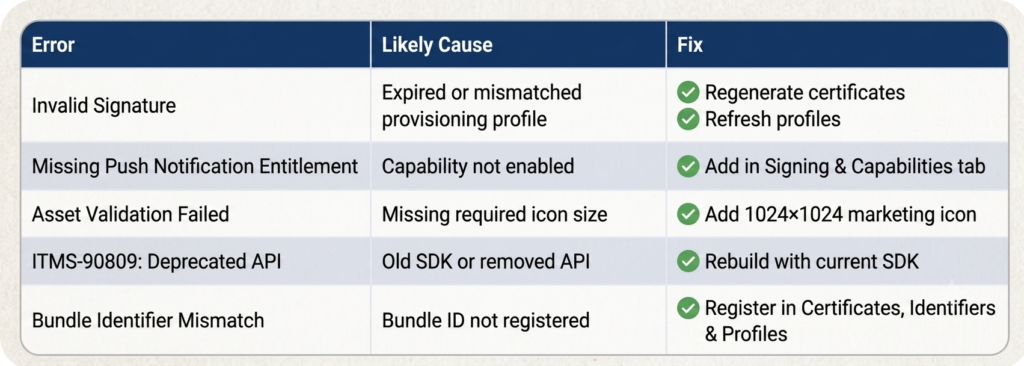
Pro tip: If you upload ios app to app store frequently, consider Xcode Cloud Apple’s built-in CI/CD service included with Developer Program membership (25 compute hours/month). It automates archive, sign, upload, and TestFlight distribution.
How to Submit an App to App Store Using App Store Connect
Once your build is processed in App Store Connect, you finish the submission inside Apple’s web dashboard.
Step 1: Create the App Record
- Sign in at appstoreconnect.apple.com.
- Go to My Apps → +.
- Select New App.
- Choose your platform(s), enter the app name, primary language, Bundle ID, and SKU.
Step 2: Configure App Information
- Category: Primary + secondary category.
- Content Rights: Confirm whether the app contains third-party content.
- Age Rating: Complete the questionnaire honestly misrepresenting age rating is a fast rejection.
Step 3: Add Pricing & Availability
- Set the price tier (or Free).
- Choose territories start with English-speaking markets and expand.
- Configure pre-orders if launching a major release.
Step 4: Upload Visual Assets
- App icon: 1024×1024 px, no transparency, no rounded corners (Apple applies them).
- Screenshots: Minimum three per device size. Lead with your strongest value proposition.
- App preview videos: 15-30 seconds, captured on real devices.
Step 5: Write Compelling Metadata
Name, subtitle, promotional text, description, keywords, support URL, privacy policy URL, marketing URL. Localize each into every market you target.
Step 6: Configure App Privacy & Data Collection
This is non-negotiable in 2026. Declare:
- Every data type collected (contact info, identifiers, usage data, etc.).
- Whether data is linked to the user.
- Whether data is used for tracking.
- The purpose of each data collection.
Step 7: Select Your Build
In the Build section, choose the processed build uploaded from Xcode.
Step 8: Add Review Information
Apple’s reviewers need:
- Sign-in credentials for any gated features (test account email/password).
- Contact info for the reviewer.
- Notes explaining anything non-obvious third-party logins, hardware requirements, beta features.
Step 9: Submit for Review
Click Add for Review → Submit to App Review. Your app status changes to Waiting for Review.
Apple App Review Process Explained
Once submitted, your app enters Apple’s review pipeline a combination of automated scanning and human moderation.
How the Review Works in 2026
- Automated Review: Apple’s systems scan for binary issues, deprecated APIs, malware signatures, and privacy-label mismatches. This typically completes within minutes.
- Manual Review: A human reviewer from the Apple Review Team installs and tests the app on a real device. They check for crashes, broken flows, misleading content, and guideline compliance.
- Human Moderation: Edge cases, AI-generated content, sensitive categories, and disputed rejections go to senior reviewers.
Typical Approval Times
According to Apple’s published data, around 90% of submissions are reviewed within 24 hours, with average approval times in 2026 sitting between 24 and 48 hours. Complex apps AR/VR experiences, financial apps, health apps, AI-generated content tools may take longer.
Review Status Definitions
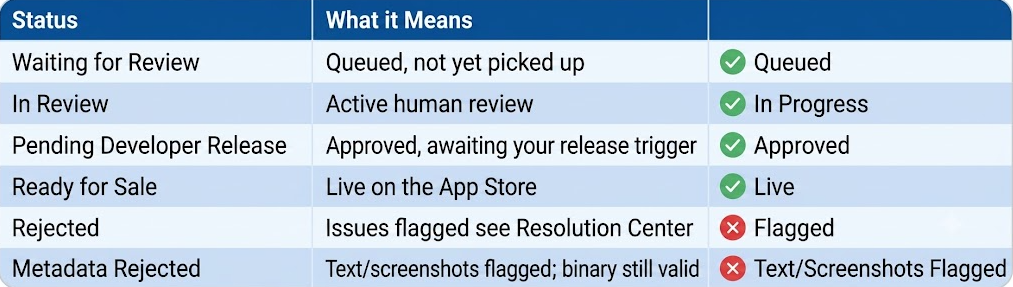
Expedited Review
If your app fixes a critical bug, has a security issue, or supports a time-sensitive event (a sponsored event, regulatory deadline, public health response), you can request Expedited Review through App Store Connect. Apple approves these case-by-case, and abusing the option will get you flagged.
What Happens After Rejection
You’ll receive a Resolution Center message citing the specific guideline. You have two paths:
- Reply with clarification sometimes reviewers misunderstand intended behavior.
- Fix and resubmit upload a new build with the issues addressed.
Both are usually re-reviewed within 24-48 hours.
Common App Store Rejection Reasons (and How to Avoid Them)
Roughly 40% of first-time submissions are rejected. Here are the patterns we see most often and how to prevent each.
1. App Crashes & Bugs
The single most common rejection. Apple reviewers won’t tolerate a single crash on initial launch.
Prevention: Run a full TestFlight cycle. Test on at least one older iOS device. Monitor crash logs.
2. Broken Links
Privacy policy URLs that 404, support URLs that don’t resolve, dead links inside the app itself.
Prevention: Pre-submission link audit. Make sure every URL works on cellular networks, not just Wi-Fi.
3. Spam, Copycat, or Cloned Apps
Apple aggressively rejects apps that mimic existing apps or repackage templates without meaningful differentiation.
Prevention: Lead with unique value. Even template-based apps need original branding, content, and a clear use case.
4. Privacy Violations
Collecting data not declared in your privacy labels. Tracking users without ATT prompts. Vague privacy policies.
Prevention: Audit every SDK. Match your privacy labels to your code. Use a privacy policy generator only as a starting point then customize it.
5. Misleading Metadata or Screenshots
Screenshots showing features that don’t exist. Descriptions that promise capabilities the app doesn’t have.
Prevention: Every screenshot must reflect real in-app functionality. Every claim in your description must be testable in the binary you submitted.
6. Incomplete Functionality
“Coming soon” sections, empty screens, placeholder data, features locked behind a “join the waitlist” wall.
Prevention: Submit only when every visible feature is functional. Beta or invite-only? Provide working test credentials.
7. Payment & In-App Purchase Violations
Using external payment systems for digital goods. Hiding subscription renewal terms. Confusing trial flows.
Prevention: Use Apple’s StoreKit for all digital purchases. Display pricing, renewal terms, and cancellation steps clearly before any payment.
8. Minimum Functionality (Guideline 4.2)
Web wrappers and apps that are essentially mobile websites without native iOS features.
Prevention: Integrate native iOS capabilities push notifications, Face ID, ARKit, on-device ML, widgets, or Live Activities.
9. AI-Generated Content Issues (New in 2025–2026)
Apps that generate AI content without moderation tools, reporting features, or clear data rights now face heightened scrutiny.
Prevention: Build in content reporting. Document your training data rights. Add age-appropriate filters.
10. Poor UI/UX Quality
Cluttered layouts, illegible text, non-standard gestures, inaccessible interfaces.
Prevention: Follow the Apple Human Interface Guidelines. Test with VoiceOver and dynamic type enabled. If this is a recurring issue for your team, it may be worth bringing in dedicated UI/UX design services before your next submission.
App Store Optimization (ASO) for Better Rankings in 2026
Getting approved is only step one. Getting discovered is the real challenge. App Store Optimization (ASO) is the discipline of ranking higher in Apple’s search results and in 2026, it intersects with AI-search discoverability too.
Core ASO Levers
- App title: Most powerful ranking signal. Include your primary keyword.
- Subtitle: Second most powerful. Use it for secondary keywords and clarity.
- Keyword field: 100 characters of comma-separated terms. No spaces between commas. Don’t repeat words already in title or subtitle.
- Description: Less weight for ranking, more weight for conversion. Front-load benefits.
- Screenshots: Drive tap-through. A/B test through Custom Product Pages.
- Ratings & reviews: Apple weights both volume and recency.
Localization as an ASO Strategy
Localizing your title, subtitle, keywords, and screenshots for each market can double or triple discoverability even if your app itself is in English. Test French, German, Japanese, Brazilian Portuguese, and Spanish first.
AI-Search & Voice-Search Discoverability
In 2026, users increasingly ask AI assistants Siri, ChatGPT, Gemini, Perplexity for app recommendations. Your App Store metadata is now indexed by generative engines too. Optimize for:
- Natural-language queries: “best meditation app for beginners.”
- Entity-rich descriptions: mention competitor categories, use cases, and integrations.
- Structured benefits: clear, scannable, AI-parseable.
Summary Bullets
- Title and subtitle drive the bulk of search ranking.
- Localization multiplies organic discovery.
- AI search engines increasingly surface apps from natural-language descriptions.
- Custom Product Pages let you A/B test conversion before scaling spend.
Explore deeper: Mobile application development services · UI/UX design services
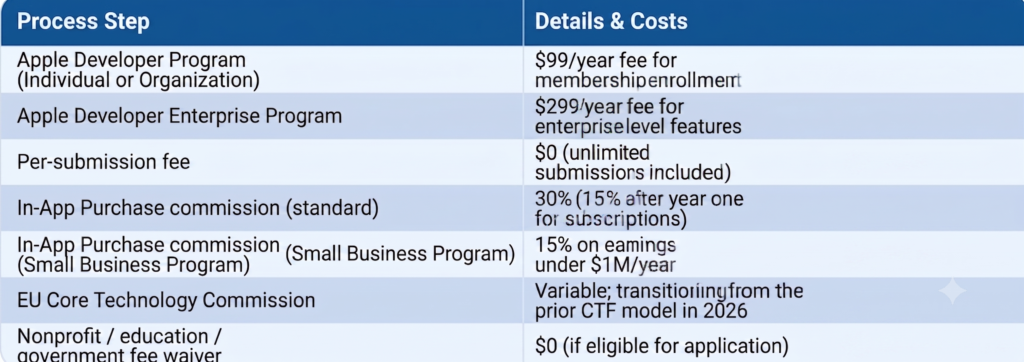
How Much Does It Cost to Publish an App on the Apple App Store?
The headline number is small. The real cost is everything around it.
Direct Apple Costs
Indirect & Operational Costs
- Development: Anywhere from $15K for simple utility apps to $300K+ for complex enterprise builds.
- Design & UX: $5K–$50K depending on scope.
- QA & Testing: 10–15% of development budget.
- ASO & marketing launch: $2K–$50K for the first 90 days.
- Maintenance: Typically 15–20% of original development cost annually.
- Compliance & legal: Privacy policy drafting, accessibility audits, GDPR/CCPA review $1K–$10K.
- Apple Push Notification, analytics, and backend infrastructure: Variable.
The app store app publish price is genuinely $99 but a serious apple app publish strategy budgets for the full ecosystem.
Why Businesses Use Professional iOS App Publishing Services
For startups and enterprises with revenue on the line, professional ios app publishing isn’t a luxury it’s risk management. Here’s what experienced publishing partners bring:
- Faster approvals: Submission specialists know which guidelines trigger reviewer attention. First-pass acceptance rates climb dramatically.
- Compliance expertise: ATT, GDPR, HIPAA (for health apps), COPPA (for kids’ apps) each has nuance an experienced team navigates daily.
- Enterprise deployment: Apple Business Manager, custom apps, MDM distribution, and Enterprise Program management require specialized workflow knowledge.
- Scalable launch infrastructure: CI/CD pipelines, automated TestFlight rollouts, multi-region phased releases.
- Startup launch support: Founders shouldn’t be debugging provisioning profiles at midnight. A trusted publishing partner absorbs that complexity.
- ASO and post-launch growth: Submission is the start, not the end. Ranking, monetization, and retention are where revenue lives.
- Security and compliance standards: Code signing, secret management, secure ios app deployment, and ongoing patch management.
Enterprise deployment CTA: For organizations launching multiple iOS apps or operating in regulated industries, partnering with an experienced mobile application development team provides enterprise ios app submission expertise, trusted app store publishing workflows, and dedicated design support through our UI/UX design services to maximize launch ROI.
2026 App Store Updates: What Actually Changed This Year
Unlike speculative predictions, these are the concrete, official Apple App Store updates rolled out in 2026 every developer should know each of them before submitting.
1. New SDK Minimum: iOS 26 Required (Effective April 28, 2026)
Apple’s biggest 2026 enforcement change. Starting April 28, 2026, every new app and every update uploaded to App Store Connect must be built with:
- iOS 26 & iPadOS 26 SDK or later
- tvOS 26 SDK or later
- visionOS 26 SDK or later
- watchOS 26 SDK or later with mandatory 64-bit support
Existing apps already on the store remain available, but the moment you ship an update, the new SDK floor kicks in. No grace period has been announced. Upgrade your build environment now.
2. The Declared Age Range API and New Age Rating System
Apple introduced the Declared Age Range API in 2026, available worldwide on iOS 26, iPadOS 26, and macOS 26 and later. Rather than collecting birthdates, this API shares an age-category signal with apps preserving privacy while giving developers the data they need for compliance.
Apple also updated its age rating questionnaire. Every developer was required to respond to the new questions by January 31, 2026 to avoid interruptions in App Store Connect submissions. The new rating values are more granular and account for AI assistants, chatbots, and user-generated content frequency.
3. US App Store Accountability Laws Took Effect
A wave of US state-level laws now requires both app stores and developers to integrate age verification, parental consent, and data minimization workflows:
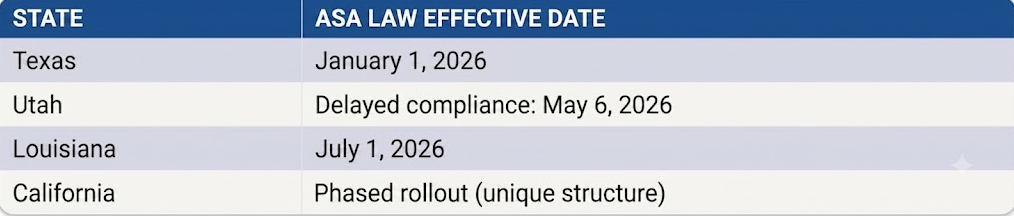
Developers must integrate Apple’s Declared Age Range API, log consent status, and restrict access for affected minor accounts. Even apps that don’t target minors must comply these laws apply broadly.
4. EU Transition from CTF to Core Technology Commission (CTC)
As of January 1, 2026, Apple began transitioning EU developers from the Core Technology Fee (CTF) to the Core Technology Commission (CTC). Under the new single business model:
- The CTC applies to digital goods and services sold via the App Store, Web Distribution, and alternative marketplaces.
- The previous €0.50 per first annual install fee structure is being phased out.
- The transition is being implemented gradually throughout 2026.
5. Japan: Alternative App Marketplaces & Payments (iOS 26.2)
To comply with Japan’s Mobile Software Competition Act (MSCA), Apple introduced major iOS 26.2 changes for the Japanese market. Developers can now:
- Distribute apps via alternative app marketplaces in Japan.
- Operate alternative app marketplaces.
- Process payments outside Apple’s In-App Purchase system for digital goods and services.
Apple has paired this with new fraud, malware, and minor-safety protections. Japan now mirrors the EU’s alternative-distribution model.
6. US App Store: External Links & Payment Buttons (Epic Decision Compliance)
After a US court decision in the Epic Games dispute, Apple updated Guidelines 3.1.1, 3.1.1(a), 3.1.3, and 3.1.3(a) to allow US-storefront apps to include buttons, external links, and other calls to action directing users to alternative payment methods. This is a major monetization shift for US-distributed apps and affects subscription strategy directly.
7. App Review Guideline Updates (November 2025–Early 2026)
Apple refreshed several guidelines that now apply to every 2026 submission:
- Guideline 1.2.1(a) — Creator apps must allow users to flag age-inappropriate content and use age-restriction mechanisms based on verified or declared age.
- Guideline 3.2.2(ix) — Loan apps cannot charge an APR above 36% (including fees) or require full repayment within 60 days.
- Guideline 4.1(c) — Apps cannot use another developer’s icon, brand, or product name without written approval.
- Guideline 4.7 — Now explicitly covers HTML5 and JavaScript mini apps and mini games.
- Guideline 2.5.10 — Deleted (the rule against empty ad banners and test ads is gone).
8. AI App Enforcement: “Vibe Coding” Crackdown
In March 2026, Apple began blocking App Store updates from AI “vibe coding” apps (tools that let non-developers build apps via natural-language prompts) unless they implemented new safeguards. Expect AI-generation apps to face significantly higher scrutiny around content moderation, IP rights, and output safety in 2026.
9. Tighter Privacy Label Enforcement & Third-Party AI Disclosure
Apple now requires apps to obtain clear user permission before sharing personal data with third-party AI services. Every third-party SDK that collects data must be reflected in your App Privacy Labels. Mismatches between declared labels and actual data flows are an increasingly common rejection reason in 2026.
10. Pricing & Tax Adjustments Across Storefronts
Apple made several 2026 pricing recalibrations using publicly available exchange-rate data. Examples include a Finland VAT reduction (14% → 13.5%) for news, magazines, books, and audiobooks, alongside global tier adjustments. Subscription price-increase notification rules also changed review the latest schedule before configuring any 2026 renewals.
Expert insight: The teams winning on the App Store in 2026 aren’t the ones with the biggest marketing budgets. They’re the ones with the cleanest compliance posture current SDKs, correctly integrated age APIs, transparent privacy labels, and a release process that handles regional regulatory differences without breaking a sweat.
Final Verdict: Submitting an App to the Apple App Store in 2026
Submitting an app to the Apple App Store isn’t a checkbox it’s a multi-disciplinary launch process that touches engineering, legal, design, marketing, and operations.
The core steps remain consistent: enroll, build, archive, upload, configure, submit, review. But the bar in 2026 is higher: privacy labels must be airtight, AI-generated content must be moderated, SDKs must be current, screenshots must be honest, and metadata must be optimized for both humans and AI search engines.
The teams that win are the ones that:
- Treat submission as a release pipeline, not a one-off event.
- Automate compliance through CI/CD and pre-submission checklists.
- Invest in ASO and AI-search discoverability from day one.
- Plan for rejection as a normal part of the cycle, not a catastrophe.
- Bring in professional publishing expertise when the stakes justify it.
Whether you’re publishing your first iPhone app or managing an enterprise portfolio, the apple app store submission process rewards preparation, discipline, and a commitment to user experience. For a refresher on best practices across both major platforms, revisit our mobile app development best practices for 2026.
FAQ
How long does Apple App Store approval take in 2026?
Apple approves roughly 90% of submissions within 24 hours, with average approval times of 24-48 hours in 2026. Complex apps, AI-generated content tools, and apps in sensitive categories like finance or health may take longer. You can request expedited review through App Store Connect for urgent fixes.
How much does it cost to publish an iPhone app on the Apple App Store?
Publishing an iPhone app costs $99 per year through the Apple Developer Program, or $299 per year for the Apple Developer Enterprise Program. There are no per-submission fees. Apple takes a 15-30% commission on paid apps and in-app purchases, with reduced rates available through the Small Business Program.
Can I submit an app to the App Store without a developer account?
No. You cannot submit an app to the Apple App Store without an active Apple Developer Program membership. A free Apple ID lets you build and test apps in Xcode and on personal devices, but distribution to the App Store requires the paid $99/year Developer Program enrollment.
Why was my iOS app rejected by Apple?
Common reasons for iOS app rejection include crashes, broken links, incomplete functionality, misleading metadata, privacy violations, copycat content, and failure to meet minimum functionality requirements under Guideline 4.2. Apple sends specific rejection reasons through the Resolution Center in App Store Connect, with clear guideline references.
How do I upload an app using Xcode in 2026?
To upload an app using Xcode: set the scheme to Release, select “Any iOS Device” as the target, choose Product → Archive, validate the archive in the Organizer, then click Distribute App and select App Store Connect → Upload. Xcode signs and transmits the build directly to App Store Connect for processing.
What are the Apple App Store submission requirements in 2026?
Apple App Store submission requirements in 2026 include an active Apple Developer Program membership, builds compiled with iOS 26 SDK or later (effective April 28, 2026), valid distribution certificates, a live privacy policy URL, complete App Privacy Labels, all required screenshots and icons, accurate metadata, and full compliance with the App Review Guidelines.
How do I release an iPhone app step by step?
To release an iPhone app: enroll in the Apple Developer Program, build the app in Xcode with current SDKs, archive and validate the build, upload it to App Store Connect, create the app listing with metadata and assets, configure pricing and privacy labels, submit for review, and release upon approval either automatically or manually. For the earlier build-planning stage, see how to develop an iOS app in 2026.
What is App Store Connect and how do I use it?
App Store Connect is Apple’s web-based platform for managing app submissions, listings, builds, pricing, analytics, and team access. Developers use App Store Connect to upload metadata, screenshots, and privacy details, select builds uploaded from Xcode, submit apps for review, and monitor performance after launch.
Can enterprises publish private iOS apps to employees?
Yes. Enterprises can distribute private iOS apps internally through the Apple Developer Enterprise Program ($299/year) or by using Apple Business Manager for custom apps. Enterprise Program apps bypass the public App Store and are distributed through Mobile Device Management (MDM) solutions to verified employees only.
How can I speed up Apple App Store approval?
Speed up Apple App Store approval by submitting fully tested, crash-free builds, providing complete and accurate privacy labels, including working test credentials in App Review notes, ensuring all links function, and following the App Review Guidelines precisely. For urgent issues, request Expedited Review through App Store Connect.