Case Study

Team Radio Real-Time Voice Messaging App

The Team Radio mobile app revolutionizes team communication with an F1-style walkie-talkie experience, featuring real-time voice messaging, immersive audio effects, and secure group chats.

Project Overview

A comprehensive look at how we transformed everyday team communication into an immersive, F1-inspired voice messaging mobile app experience.

Overview

Team Radio approached Go Tech Solutions with a vision to bring the speed and intensity of Formula 1 team radio communication into everyday group messaging. Whether coordinating a business team, staying connected with friends and family, or living out a racing fantasy, users wanted instant voice messaging that felt fast, immersive, and distinctly different from a standard chat app. Team Radio needed a mobile app that could combine real-time voice with the bold, motorsport-inspired identity its audience would instantly recognize.

The Challenge

Most messaging apps treat voice notes as an afterthought, buried behind text input and generic playback controls, with no personality or sense of urgency. There was no walkie-talkie style experience built specifically for quick, push-to-talk voice communication across teams and groups, complete with adjustable audio effects and a distinctive racing-inspired interface. Users needed a single mobile app where direct chats, team channels, voice recording, and profile customization all lived together in one fast, focused workflow.

Our Solution

Go Tech Solutions designed and developed the Team Radio mobile app, a voice-first communication ecosystem styled after Formula 1 team radio. The app opens with a unified Grid View of every conversation, then gives users a dedicated recording studio with live waveform feedback and pitch control, a focused team chat thread for voice and text messages, and a personalization hub for profile and team identity. We built a bold black-and-red interface throughout, so every screen reinforces the high-speed, motorsport energy at the heart of the brand.

Screen-by-Screen Walkthrough

01

Grid View

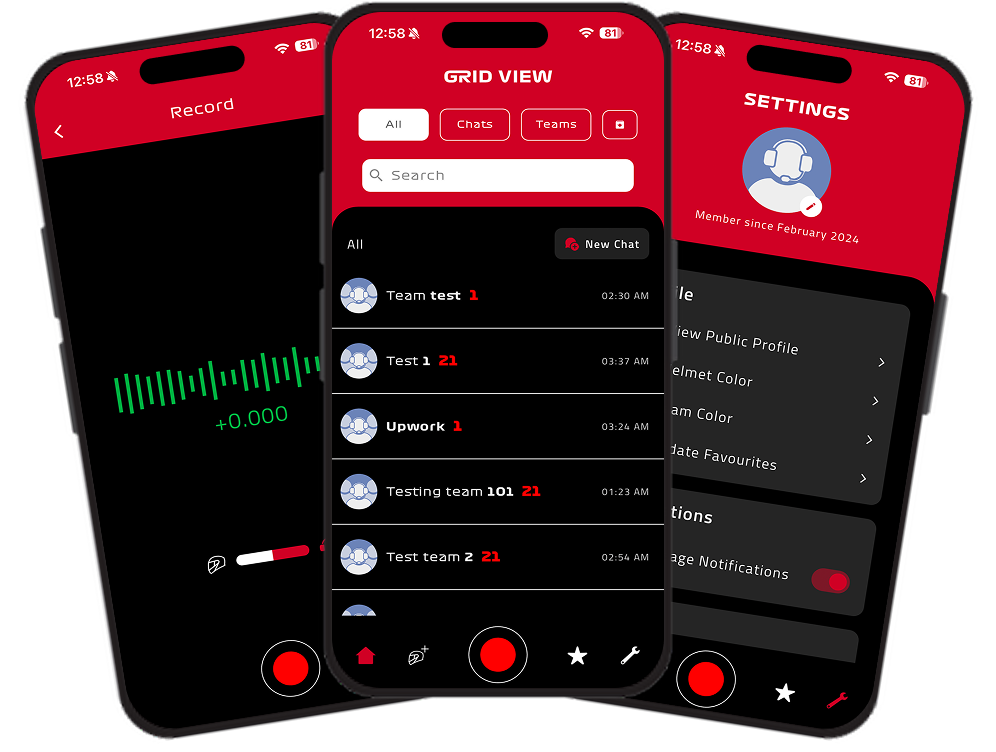
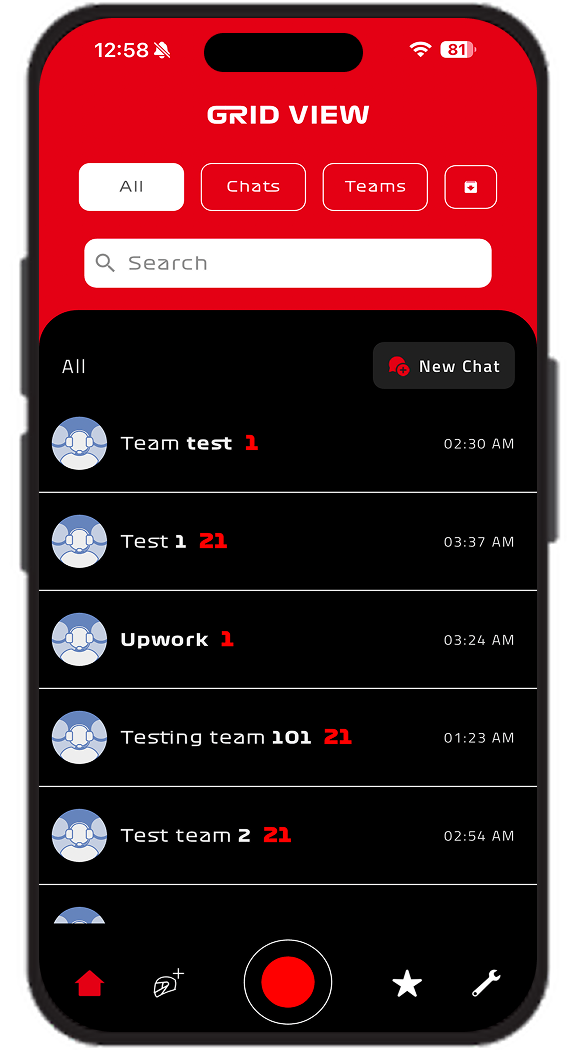
The mobile app opens on the Grid View, a bold black-and-red home screen listing every conversation in one place. Filter pills for All, Chats, and Teams sit at the top alongside a New Chat action, with a search bar just below for quickly locating a contact or team. Each conversation row shows the team or contact name, an unread message count, and the timestamp of the latest activity, giving users an immediate overview of where conversations stand.

Team Radio conversation grid view screen
02

Settings

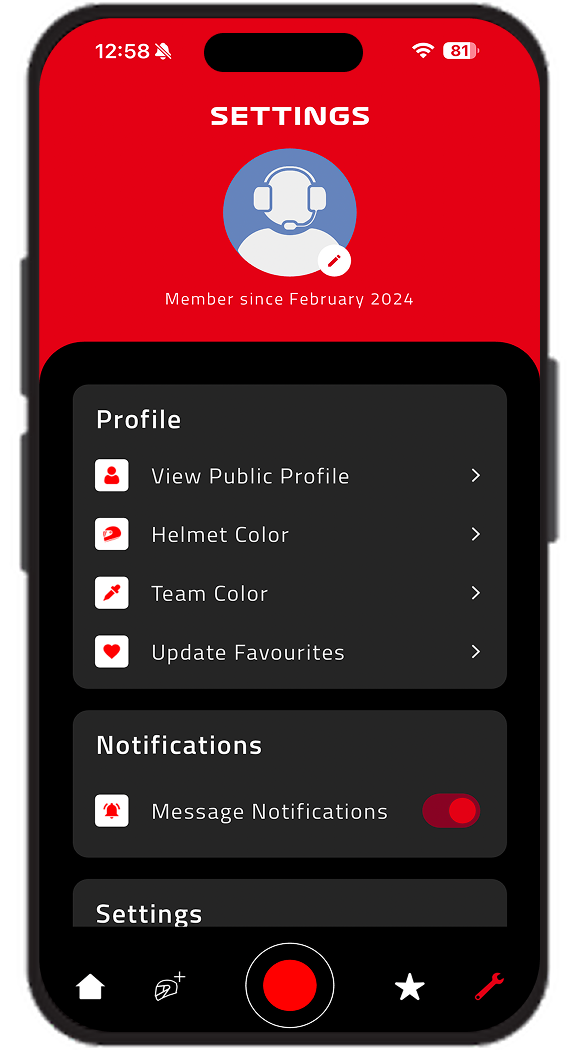
The Settings screen opens with the user's profile photo and membership date, "Member since February 2024," displayed prominently at the top. A Profile section offers quick access to View Public Profile, Helmet Color, Team Color, and Update Favourites, letting users personalize their racing identity within the app. Below it, a Notifications section includes a Message Notifications toggle, giving users direct control over how the app alerts them.

Team Radio profile and settings screen
03

Record

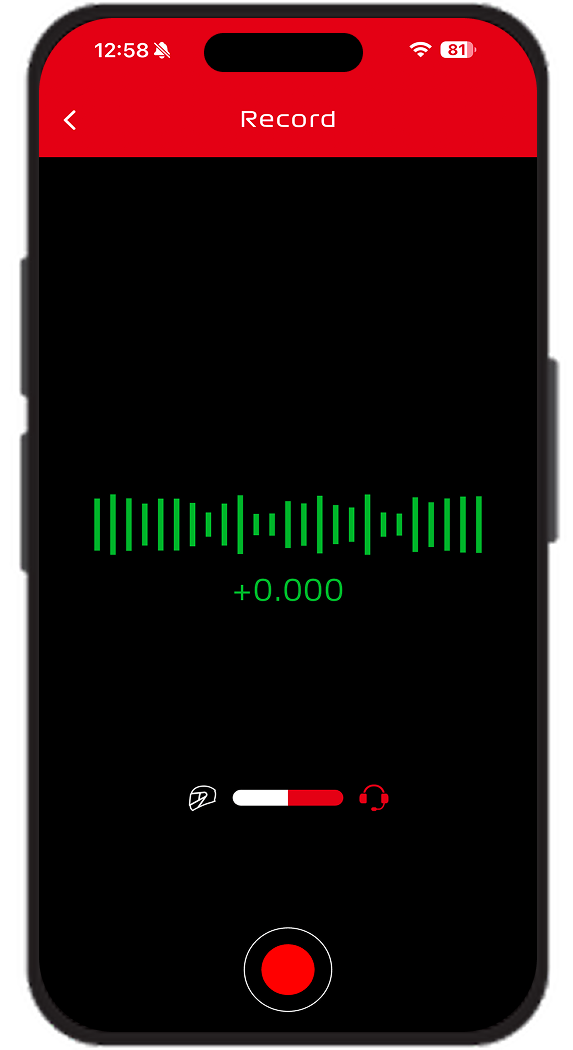
Tapping the central record button opens the Record screen, a focused, distraction-free interface built for capturing voice messages. A live animated waveform spans the center of the screen as the user speaks, with a real-time pitch value displayed just below it. A horizontal effects slider and a large red record button anchor the bottom of the screen, reinforcing the walkie-talkie, push-to-talk feel central to the app's identity.

Team Radio live voice recording screen
04

Team Chat

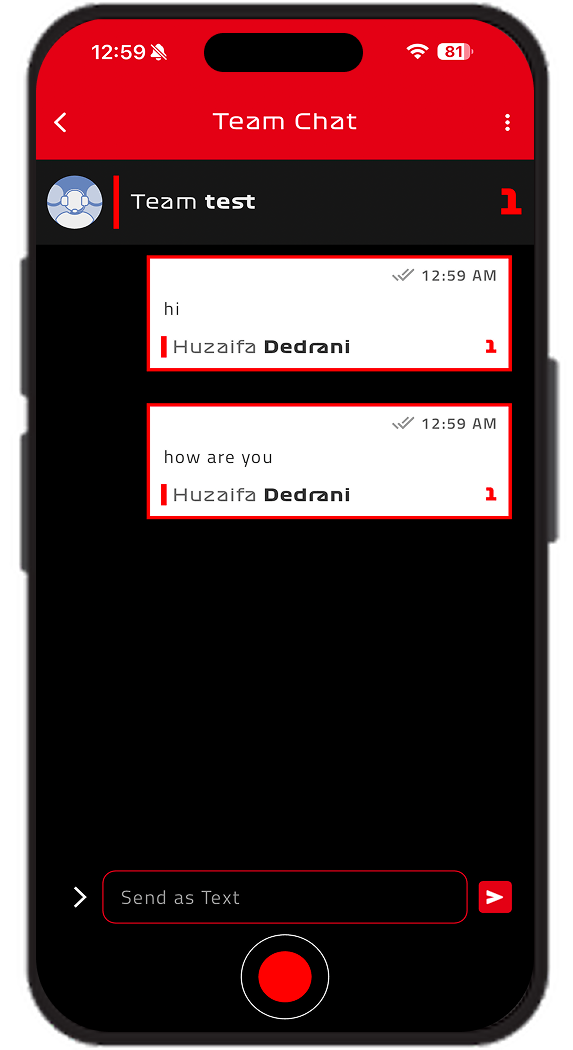
Opening a conversation such as Team test brings up the Team Chat screen, where messages from team members appear as clean, timestamped bubbles with read indicators. A "Send as Text" input field sits above the persistent record button at the bottom, letting users seamlessly switch between typing a quick reply and sending a voice message without leaving the conversation.

Team Radio team chat conversation screen
Key Features

Comprehensive Feature Set

Every feature was built into the mobile app to deliver a fast, immersive, and distinctly branded voice communication experience.

Unified Grid View

The Grid View home screen brings every conversation into one searchable list, with quick filters for All, Chats, and Teams, so users can instantly jump between direct messages and group channels.

Real-Time Voice Messaging

A prominent push-to-talk style record button sits at the center of the navigation, putting instant voice messaging just one tap away from anywhere in the app.

Live Recording Studio

The Record screen displays a live animated waveform as the user speaks, paired with a real-time pitch readout, giving every voice message a visual, F1 walkie-talkie-style recording experience.

Adjustable Audio Effects

A built-in pitch and tone slider lets users customize how their voice sounds before sending, adding a layer of personality and engagement that standard voice notes do not offer.

Direct & Group Team Chat

Inside each conversation, users can send messages as Text or as voice recordings, with read receipts and sender names clearly displayed, supporting both quick one-on-one chats and full team threads.

Profile & Team Customization

The Settings screen lets users View Public Profile, choose a Helmet Color and Team Color, and Update Favourites, turning personal identity into part of the racing-inspired experience.

Notification Controls

A dedicated Message Notifications toggle inside Settings gives users direct control over alerts, keeping the experience responsive without becoming overwhelming.

Project Outcome

Project Outcome & Business Impact

Team Radio successfully launched a mobile app that transformed everyday voice communication into a fast, immersive, motorsport-inspired experience.

Distinctive Brand Experience

Replaced generic voice notes with a bold, F1-style walkie-talkie interface that makes every message feel fast and engaging.

Unified Conversation Hub

Direct chats and team channels live together in one searchable Grid View, eliminating the need to dig through separate inboxes.

Personalized Team Identity

Helmet colors, team colors, and favourites let users express their racing identity throughout the app experience.

Seamless Voice & Text Flexibility

Users can switch between voice recordings and text messages within the same conversation, without breaking their communication flow.

Team Radio mobile app project outcome and business impact
Technology Stack

Built With Modern Technology

We used industry-leading technologies to ensure scalability, security, and performance.

Frontend

React NativeTypeScriptReal-Time Audio UI

Backend

Node.jsWebSocketsREST APIs

Mobile

iOSAndroidCross-Platform

Audio

WebRTCPitch ControlWaveform Processing

Infrastructure

AWSCI/CDMonitoring

Security

End-to-End EncryptionSecure ChannelsJWT Auth
Ready to Get Started?

Let’s Build Something Worth Having

If your team or community needs communication that goes beyond generic voice notes, it's time for a smarter mobile solution. Just like we did for Team Radio, Go Tech Solutions can design and build a custom voice-first app tailored to your brand and users.

Let's bring real-time voice messaging, immersive audio effects, and secure group communication to your product.

The next step is simple:

Book a free 30-minute consultation. We’ll listen to what you’re building, ask the right questions, and give you an honest assessment of timeline, approach, and fit. No pressure. No sales pitch. Just a real conversation.

Get Custom Proposal, 24hr Response

Tell Us About Your Project

Our team will outline scope, timeline, and investment within 24 hours.

By submitting this form, you agree to our Privacy Policy.

Call Us

+1 469 809 6982

Email Us

info@gotechsolutions.co

Location

Houston, Texas, USA