Case Study

Mondelēz International Visitor Management

Digitizing front-desk operations through automation, from role-based visitor portals to real-time check-in tracking and host approval workflows.

Project Overview

A comprehensive look at how we transformed paper-based front-desk operations into a digital visitor management system.

Overview

Mondelez International needed to replace manual, paper-based front-desk operations with a fully digital, role-based visitor management system. Large corporate facilities receive constant streams of visitors, contractors, and business guests daily, yet no centralized system tracked arrivals, hosts, or check-in status. Go Tech Solutions designed a Smart & Secure Visitor Management System delivering real-time tracking, automated approvals, and instant notifications across three dedicated portals, all powered by a shared visitor database.
The Challenge

Corporate facilities must balance a smooth visitor experience with tight building security. Without a digital system, gate staff cannot verify visitors in advance, employees lack visibility into who is waiting, and management has no analytics on visitor volume or traffic patterns, while three distinct user groups need the same visitor data through completely different views and actions, making a one-size-fits-all interface impractical.

Our Solution

Go Tech Solutions built a single Visitor Management System with three dedicated, role-based portals sitting on one shared visitor database. Each role sees the same underlying visitor record through a screen tailored to their workflow, administrators gain oversight and analytics, employees access approval and invite-creation tools, and gate staff manage real-time check-in and check-out controls.

Screen-by-Screen Walkthrough

01

Login

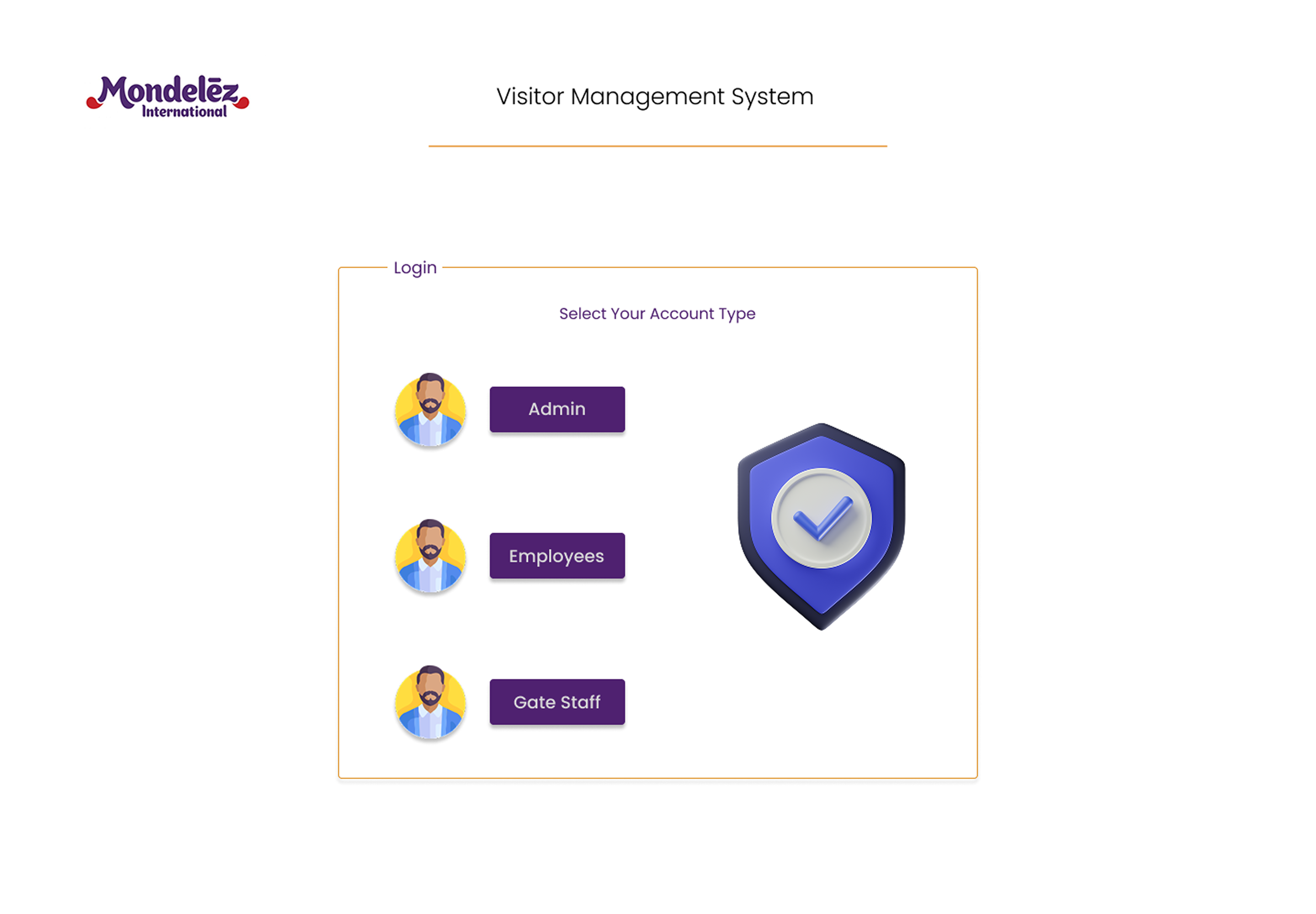
The system opens with a branded login screen displaying three distinct entry points: Admin, Employees, and Gate Staff, each paired with an avatar icon. This design choice routes users directly into the dashboard matching their job, preventing a cluttered, generic interface. A shield-and-checkmark icon reinforces the platform’s core promise: secure, verified access.

Mondelēz International role-based login screen with Admin, Employee, and Gate Staff portals
02

Admin Portal

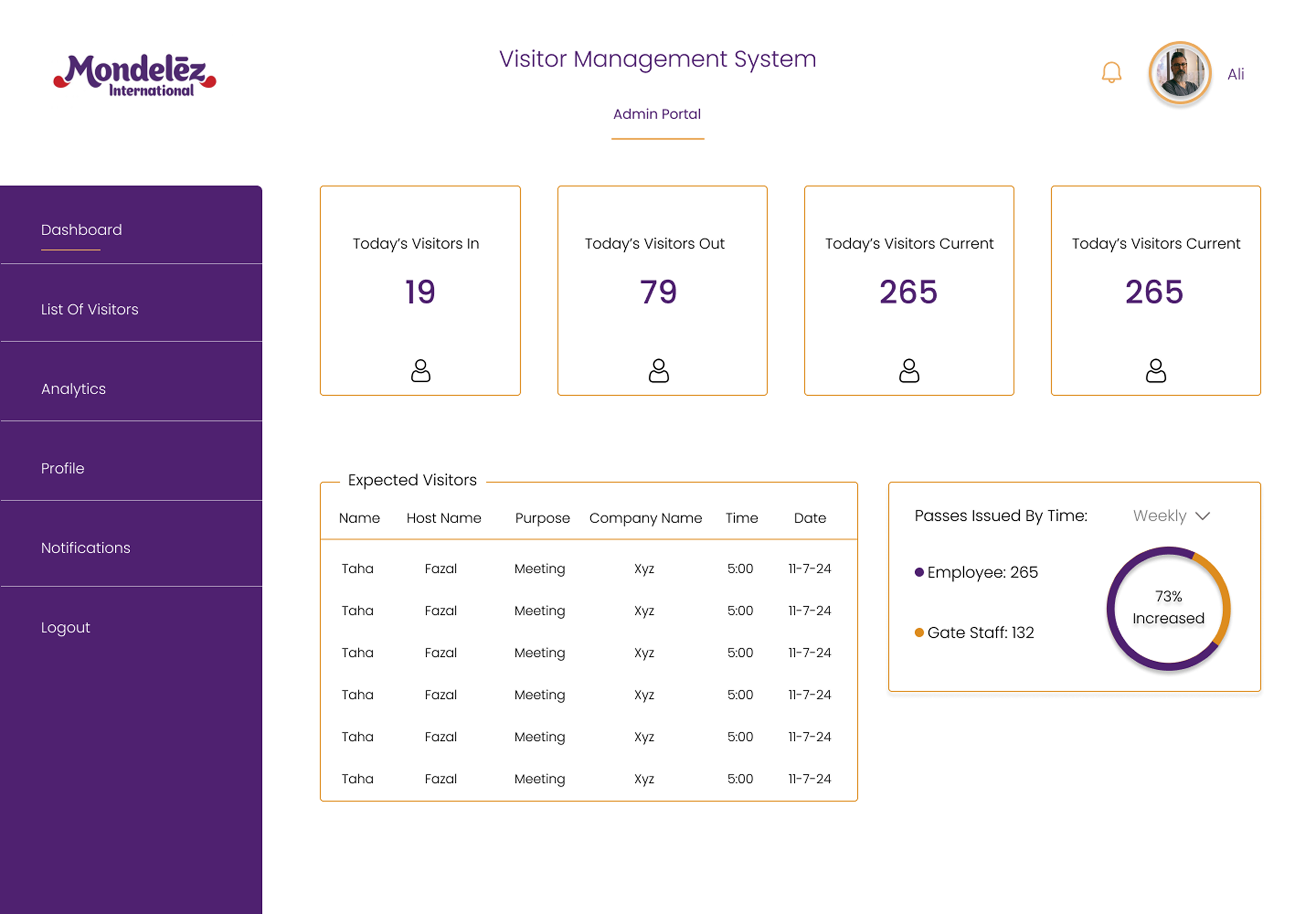
The Admin dashboard presents four summary cards, Today’s Visitors In, Today’s Visitors Out, and two Current metrics, providing an instant numeric snapshot of building occupancy. An Expected Visitors table lists upcoming appointments with Name, Host Name, Purpose, Company Name, Time, and Date.

The Analytics screen converts raw visitor logs into actionable insights: circular progress charts display Return Visitors (76%), New Visitors (58%), Declined Visitors (26%), and visit purpose breakdowns, Business (80%), Meeting (50%), Job (40%). This answers critical questions for compliance and facilities teams without requiring spreadsheet analysis.

A List of Visitors screen serves as the master record of every visitor across the organization, capturing Name, Host Name, Purpose, Company Name, Time, Cnic (national ID), and Status, with statuses like Expected, Checked In, In Meeting, Checked Out, and Cancelled providing real-time journey visibility.

Mondelēz International Admin portal dashboard and analytics
03

Employee Portal

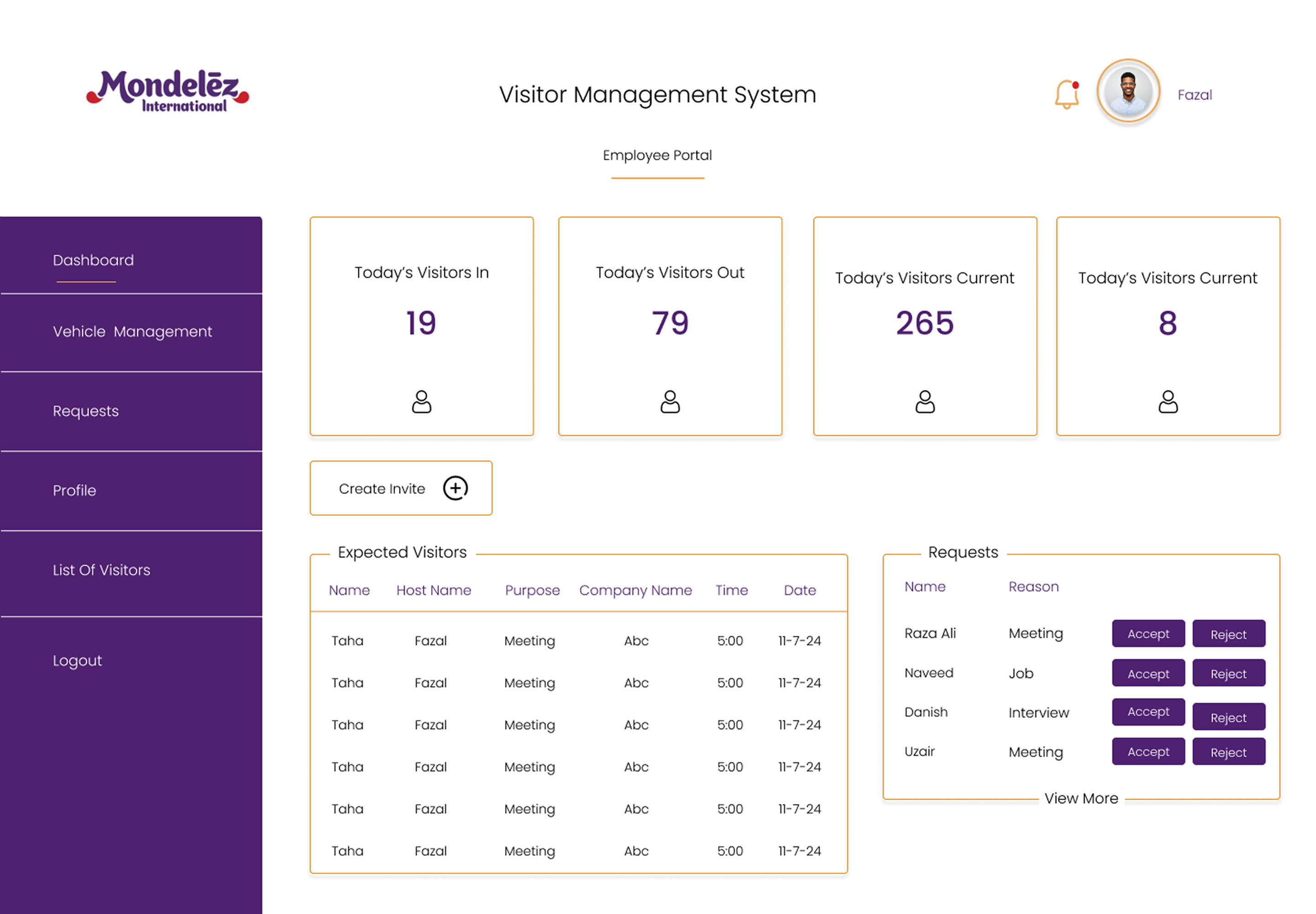
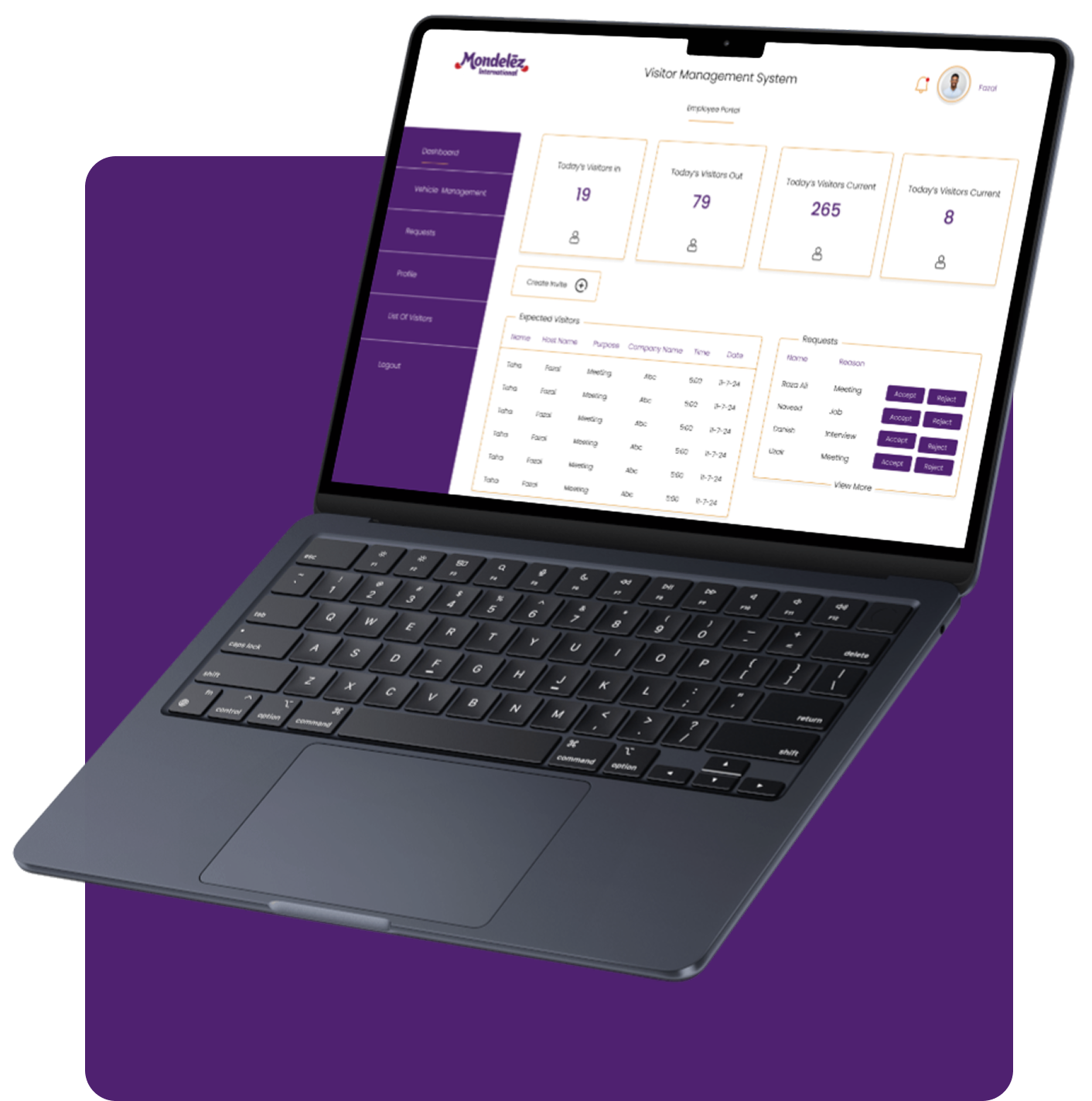
Logging in as an Employee displays a personal dashboard scoped to that individual’s own visitors. The same four-card layout reappears but reflects personal context, showing visitors waiting specifically for that employee. A prominent Create Invite button lets employees pre-register guests directly from the dashboard.

The Requests screen expands into a complete table where Employee approval happens. Every visitor listing this employee as host appears here; nothing reaches “Checked In” status at the gate until the host explicitly accepts. This human checkpoint ensures gate staff and admins see the full pipeline, but employees retain ultimate authority over who enters.

Employees also access their own List of Visitors screen showing all their guests’ live statuses, whether Checked In, In Meeting, or still Expected, without asking the front desk.

Mondelēz International Employee portal dashboard and requests
04

Gate Staff Portal

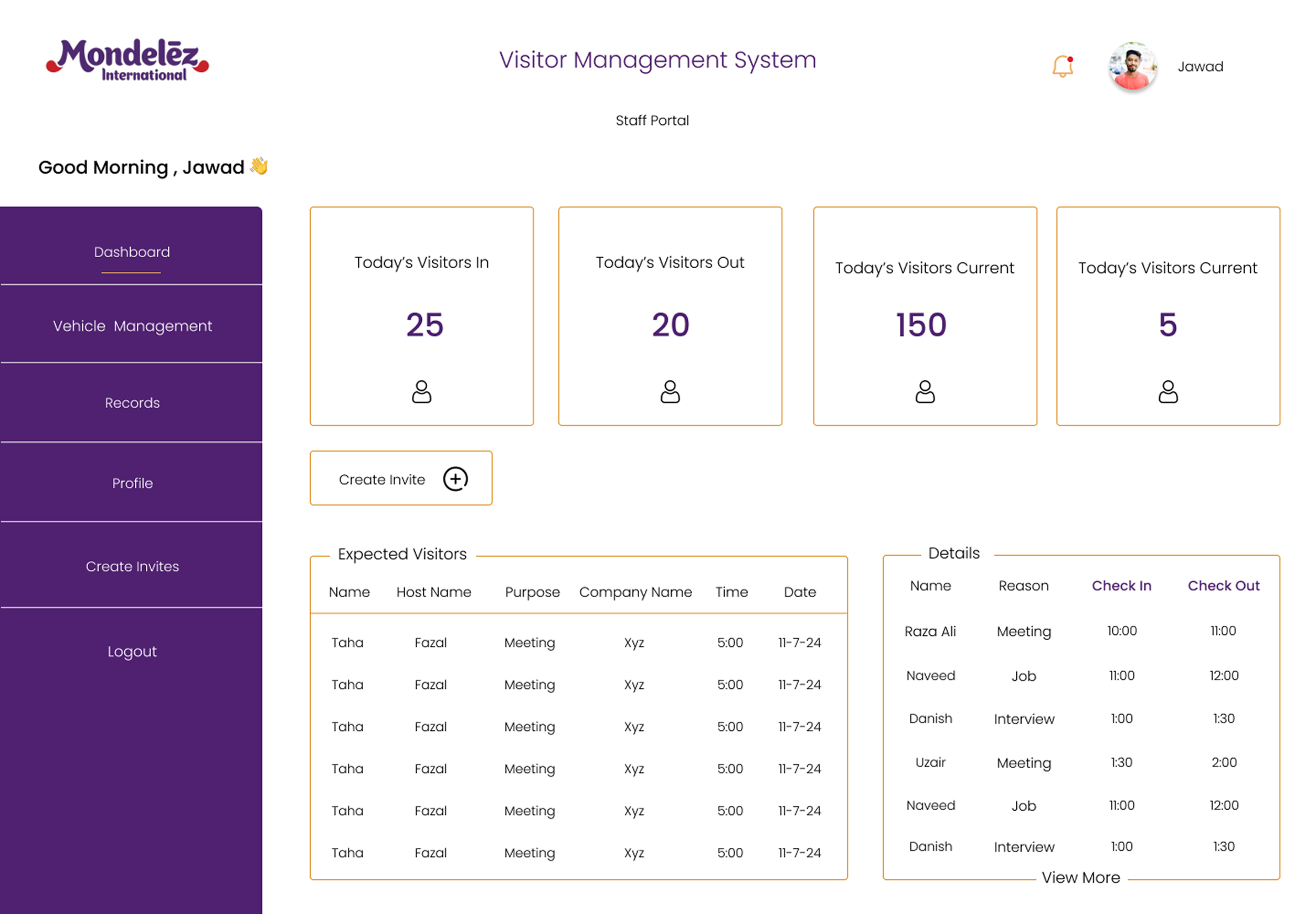
The Gate Staff dashboard greets the logged-in officer by name and surfaces critical numbers: Today’s Visitors In (25), Today’s Visitors Out (20), and Current metrics (150 and 5) for live building occupancy awareness. Like the Employee dashboard, a Create Invite button handles walk-in registration on the spot. A Details panel shows actual Check In and Check Out timestamps for recent visitors.

The Records screen is the gate team’s master log capturing Name, Host Name, Purpose, Company Name, Check In, and Check Out with precise timestamps. Unlike Admin and Employee screens tracking status labels, this table reflects pure physical movement, what actually happened at the door, crucial for security audits and compliance reviews.

Mondelēz International Gate Staff portal dashboard and records
05

Create Invite

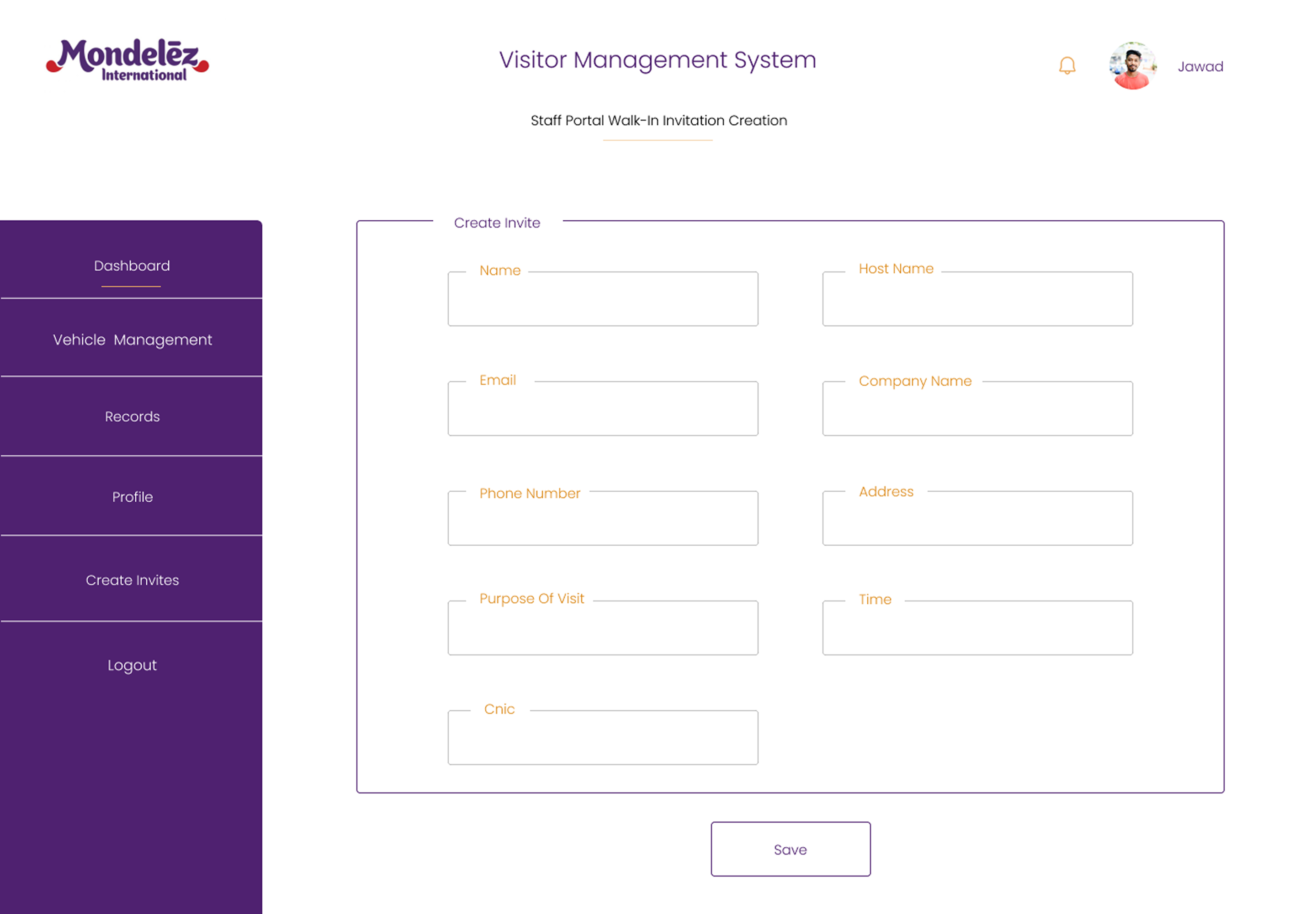
The Walk-In Invitation Creation form lets gate staff log unexpected visitors properly and route them to the right host, capturing Name, Host Name, Email, Company Name, Phone Number, Address, Purpose of Visit, Time, and Cnic. Once saved, walk-in visitors enter the identical pipeline as pre-registered guests.

Mondelēz International walk-in invitation creation form
Key Features

Comprehensive Feature Set

Mondelēz International empowers corporate facilities with a Smart & Secure Visitor Management System designed to scale front-desk operations across every role.

Fast & Secure Check-Ins

Role-based login and structured Check In/Check Out flow at the Gate Staff portal ensure every visitor’s entry and exit is logged instantly with no manual paperwork.

Real-Time Visitor Tracking & Alerts

Live dashboard counters, visible across Admin, Employee, and Gate Staff portals, provide always-current building occupancy views.

Pre-Registration & Scheduling

The Create Invite feature lets hosts pre-register expected guests with full details, automatically populating the Expected Visitors table.

Custom Badge Printing & Access Control

Captured visitor details, including Cnic, host, company, and purpose, provide structured data for visitor badges and entry point access rules.

Detailed Reports & Analytics

The Admin Analytics screen converts visit logs into actionable percentages covering return visitors, new visitors, declined requests, and visit purpose breakdowns.

Host Notifications & Approvals

The Employee Requests screen routes every visit request to its host with one-click Accept/Reject actions, ensuring no visitor is checked in without explicit approval.

Access Control Integration

The shared visitor database integrates with physical security infrastructure, syncing approved visitor status with door and gate systems.

Multi-Tenant & Multi-Location

The Company Name field captured on every record allows the system to scale across multiple host companies and facility locations.

Compliance Logs & Audit Trails

The Gate Staff Records screen maintains precise Check In/Check Out audit trails independent of scheduling status, providing security teams reliable historical logs.

Secure Roles & Data Privacy

Three distinct portals enforce role-based access from the first login screen, with structured forms and secure cloud storage for sensitive visitor information.

Project Outcome

Project Outcome & Business Impact

Mondelez International now operates a fully digital, role-based Visitor Management System replacing manual front-desk logs with a real-time, auditable pipeline.

End-to-End Visitor Visibility

Every journey, from Expected through host Approval to Checked In and Checked Out, is tracked and visible in appropriate detail to all roles across the organization.

Faster, Host-Controlled Approvals

Decisions sit directly with employees being visited, removing bottlenecks and ensuring no visitor enters without explicit host authorization.

Reliable Security & Compliance Trail

Gate Staff Records maintain dependable audit records of physical check-ins and check-outs, independent of scheduling status labels.

Management-Level Insight

Admin Analytics converts daily visitor activity into clear metrics supporting better facility planning, compliance reporting, and traffic pattern analysis.

Mondelēz International web application project outcome and business impact
Technology Stack

Built With Modern Technology

We used industry-leading technologies to ensure scalability, security, and performance.

Frontend

ReactTypeScriptTailwind CSS

Backend

Node.jsExpressREST APIsWebSockets

Database

PostgreSQLRedis

Infrastructure

Cloud HostingCI/CDAutomated Backups

Security

Role-Based Access Control (RBAC)JWT AuthenticationEncrypted Data StorageAudit Logs
Ready to Get Started?

Let’s Build Something Worth Having

If your organization is still relying on paper sign-in sheets or disconnected tools to manage visitors, contractors, and guests, it’s time for a smarter approach. Just like we did for Mondelēz International, Go Tech Solutions can design and build a custom, role-based Visitor Management System tailored to your facility’s security and compliance needs.

Let’s bring real-time tracking, automated approvals, and complete visibility to your front desk.

The next step is simple:

Book a free 30-minute consultation. We’ll listen to what you’re building, ask the right questions, and give you an honest assessment of timeline, approach, and fit. No pressure. No sales pitch. Just a real conversation.

Get Custom Proposal, 24hr Response

Tell Us About Your Project

Our team will outline scope, timeline, and investment within 24 hours.

By submitting this form, you agree to our Privacy Policy.

Call Us

+1 469 809 6982

Email Us

info@gotechsolutions.co

Location

Houston, Texas, USA